

Research Paper Cover Page – Key Takeaways
- Title Page Importance
- Introduces the research paper with essential identification information.
- Sets a professional tone for the rest of the paper.
- Helps readers easily locate and identify key details, like author, course, and due date.
- Key Elements for a Professional Cover Page
- Title of the Paper: Centered, bolded, and clearly represents the subject of the paper.
- Author’s Name: Full name in a standard format without titles like Dr. or Ph.D.
- Institutional Affiliation: The university or institution the paper is affiliated with.
- Course Information: Includes the course number, course name, and instructor’s name.
- Assignment Due Date: Clear date format (MM/DD/YYYY).
- Page Number: Must appear in the top-right corner, starting on the title page.
- Formatting and Design Tips
- Use readable academic fonts (e.g., Times New Roman or Arial) in size 12-point.
- Ensure all text is double-spaced, including the title, author name, and other details.
- For APA style, insert a running head if required, and align the page number flush right.
- Avoid overuse of abbreviations; write full terms for clarity and professionalism.
- Ensure proper indentation where required (e.g., first paragraph of each section in APA).
- Use Templates
- Editable templates help guide formatting and ensure consistency.
- Templates make it easier to include all necessary elements without formatting errors.
APA vs MLA Research Paper Cover Pages
| Element | APA Format | MLA Format |
|---|---|---|
| Title Page | Required for student papers, includes full details | Not required unless specified by the instructor |
| Title Formatting | Centered, bolded, title case | Centered, regular font |
| Author’s Name | Full name, centered | Full name, aligned left at the top of the first page |
| Page Number | Page number inserted in the top-right corner | Page number inserted in the top-right corner starting from page 1 |
| Running Head | Included for professional papers, optional for student papers | Not used |
| Additional Information | Course number, instructor, due date all included | Student’s name, instructor, course, and due date at the top of the first page |
What is a Research Paper Cover Page?
- A research paper cover page, also known as a title page, is the very first page of an academic paper that introduces the document to the reader. It provides basic identification information about the paper before the actual content begins. This cover page serves to present the title of the paper, the author’s name, the institution, and other identifying details.
- Main Elements:
A research paper cover page typically includes the following elements:- Title of the Paper: The title should be clear, concise, and directly related to the paper’s subject.
- Author Name: The full name of the individual who wrote the paper.
- Institutional Affiliation: The name of the university, college, or research institution to which the author belongs.
- Course Number and Name: Relevant information to identify the course associated with the paper.
- Instructor Name: The name of the course instructor.
- Assignment Due Date: The date the assignment is due.
- Location of Information: The title page should have the title of the paper placed at or near the top of the page, centered. The remaining details (author, institution, course name, etc.) typically follow in the bottom half of the page, spaced out appropriately.
- Visual Design: The design of a research paper cover page is critical in setting the tone for the rest of the paper. It should be formatted according to academic style guidelines, ensuring that the layout is clean, professional, and easy to read.
- Importance of First Impressions: The cover page is the first impression of the paper. A well-structured and organized cover page communicates professionalism and attention to detail, while a poorly formatted page may detract from the overall perception of the paper.
Importance of a Research Paper Cover Page
- Provides Identification: The research paper cover page serves as the first point of identification for a paper. It helps instructors or readers quickly identify the paper’s title, author, and relevant course information. By including the author’s name, course name, and due date, the cover page also ensures that the paper is appropriately linked to the correct assignment.
- Creates a Professional Appearance: A professionally formatted research paper cover page enhances the overall appearance of the paper. It gives the paper a polished, academic look, making it stand out in an academic setting. This first impression can be especially important when submitting to professors or for publication in academic journals.
- Helps in Organization: The cover page helps organize the submission process. When submitting papers for courses with multiple students, it allows instructors to quickly scan papers for the necessary student information, course, and due date, thus streamlining the grading process.
- Follows Academic Standards: By adhering to the correct formatting guidelines, a properly designed research paper cover page demonstrates respect for academic traditions and standards. Following these standards ensures that the paper meets the expectations of the academic community, whether in APA, MLA, or other academic styles.
- Facilitates Easy Reference: When working with long documents or multiple submissions, having a clear title page for research makes it easier to locate the paper in a stack of submissions. The paper can be quickly identified by the instructor based on the course number, author, and assignment details. You can also learn how to write a research paper in our detailed blog guidelines provided.
Struggling with Your Research Paper?
Get expert assistance with your research paper writing from Best Dissertation Writers . Our team specializes in providing research paper writing services , ensuring well-structured, high-quality papers tailored to your academic needs. Visit our site to get professional guidance and elevate the quality of your research paper.
Get Professional HelpAPA Research Paper Cover Page Format
- Title of the Paper: In APA format, the title of the paper should be centered at the top of the title page. The title must be written in title case (i.e., the first letter of each major word is capitalized) and bolded. This ensures that the title stands out and is easily visible.
- Author Information: The author’s name should be written below the title, centered as well. The author’s name is written in the standard format: First Name, Middle Initial(s), Last Name. There should be no titles (like Dr.) or degrees (like Ph.D.) in this section.
- Institutional Affiliation: The institutional affiliation follows the author’s name and identifies the university or institution where the paper was written. This is important because it places the paper within the academic context of the writer’s institution.
- Course Information: The course number and course name are placed next on the title page. This is critical because it links the paper to a specific class. The format for this information is as follows: Course Number, Course Name.
- Instructor’s Name: The name of the instructor follows the course information. The instructor name is usually presented in the same format as the course name.
- Assignment Due Date: The assignment due date is the final piece of information to be included on the APA title page. It should be written in a standard date format (e.g., MM/DD/YYYY).
- Page Number and Running Head: In APA 7, student papers do not require a running head on the title page unless specified by the instructor. However, the page number must appear in the header on the top-right corner of the page. The number should be inserted using the Microsoft Word page number tool.
- Font and Spacing: The font used in the title page (and throughout the paper) must be a readable, academic font like Times New Roman (12 pt). The text should be double-spaced, ensuring readability and compliance with academic writing standards.
- APA 7 Title Page for Students: The main difference between a student paper and a professional paper in APA format is the running head. For student papers, there is no running head with the title of the paper in uppercase letters. However, for professional papers, the running head is still required in the header, along with the page number.
MLA Research Paper Cover Page Format
- Title Page Requirement: Unlike APA format, the MLA format does not require a separate cover page unless explicitly requested by the instructor. Instead, MLA typically has the student’s information at the top of the first page.
- Student Information: At the top-left of the first page, MLA format requires the following details in this order:
- Student’s Name: Full name of the student.
- Instructor’s Name: The name of the instructor.
- Course Name: The course for which the paper is written.
- Assignment Due Date: The date the paper is due (usually in day, month, year format).
- Paper Title: The title of the paper should appear below the student information, centered on the page. MLA format does not require the title to be bolded, italicized, or underlined—simply the title in regular font.
- Page Number: An MLA paper includes the student’s last name and the page number in the header, aligned to the right margin. This allows readers to keep track of the pages as they review the paper.
- No Running Head: In MLA format, there is no need for a running head or any other identifying information in the header apart from the page number. The page number should appear on every page of the essay.
- No Separate Cover Page: In MLA, the cover page example is not needed unless specified by the instructor. The first page typically includes all the necessary student and course information.
Choosing the Right Format: APA vs MLA
- APA vs MLA: The decision to choose APA or MLA format depends on the discipline of the research paper and the instructor’s requirements.
- APA format is most commonly used in the social sciences, including psychology, education, nursing, and business.
- MLA format is typically used in the humanities, including literature, language studies, history, and cultural analysis.
- APA for Research-Based Writing: If the paper involves a lot of research, references, data collection, or statistical analysis, APA style is likely the better choice. APA format is more structured in terms of organizing research and data presentation.
- MLA for Text-Based Writing: If the paper is more about discussing literary themes, interpreting texts, or analyzing historical contexts, then MLA format is preferred. MLA focuses more on citations and is ideal for papers with heavy use of literary works.
- Cover Page Requirement:
- APA often requires a research paper cover page with all the formal details, making it useful for formal, structured submissions.
- MLA, on the other hand, rarely requires a separate title page, and the student’s details usually appear on the first page of the paper.
- When in Doubt: If you’re unsure which style to use, always consult your assignment guidelines or check with your instructor. Each format has different expectations, and selecting the correct one will ensure you follow proper academic standards.
Certainly! Here’s the blog post section in detailed point form, written naturally for easy reading and understanding. I’ve followed the guidelines you provided and ensured the SEO keyword and related terms are integrated smoothly.
Tips for Making a Cover Page Stand Out
Creating a standout research paper cover page can make a positive impression on your reader right from the start. Whether you’re submitting a student paper or a professional research project, here are some tips to ensure your title page looks polished and professional:
- Follow the Correct Format:
- The most important step is to follow the proper formatting guidelines for the research paper cover page. Be sure to use the correct style (e.g., APA, MLA) for your discipline.
- In APA format, the title should be centered in the middle of the page, and the font should be clear and legible, such as Times New Roman 12-point font.
- Ensure that all margins are set to one inch on all sides, as per standard academic formatting.
- Make Your Title Stand Out:
- The title of your paper is the most important part of the research paper cover page. It should be centered and bold and should give the reader a clear idea of what the paper is about.
- Avoid using overly complex or long titles. Instead, aim for a concise and clear title that summarizes your paper’s content.
- If there is a subtitle, make sure it’s placed directly below the main title, in regular font, and without italics. The title should be centered at the top half of the title page.
- Professional Appearance:
- Keep the cover page professional-looking and free from unnecessary decorations. Simple, clean lines will create a more formal and academic tone.
- Use a standard font like Times New Roman or Arial. Avoid using bold or italics unless specified by the style guide.
- Double-space the content on the title page, as required by APA 7 and MLA format.
- Use Templates to Get Started:
- If you’re new to creating a research paper cover page, templates are a great resource to help you follow the format properly. Look for page templates that are customizable and editable for your specific needs.
- Templates often include placeholders for each section, such as author name, institution, and course information, making it easy to ensure you’ve included all the necessary details.
- Position Information Correctly:
- The author note, if required, should be placed in the bottom half of the title or at the end of the title page, depending on the style guide.
- Include key elements like the author’s name, institutional affiliation, course number and name, and due date. In APA, student papers also require a page number in the top-right corner.
- Use the Correct Spacing:
- A double-spaced line between each section of your title page will make the information easy to read and maintain a neat appearance.
- Be sure to leave space between the title of your paper, author’s name, and other details so each element stands out.
- Avoid Abbreviations:
- Unless specified, avoid using abbreviation in the title, author’s name, or other parts of the cover page. Write out full words to maintain a formal academic tone.
- Page Header and Numbering:
- The page header should include the title of your paper (or shortened version) and the page number, aligned to the flush right of the page in APA format. The page number should be inserted starting from the title page.
- For student papers, the running head is not necessary unless the instructor specifies it.
Cover Page Example: APA Style vs MLA Format
To better understand the differences between APA and MLA cover page formats, let’s look at a side-by-side comparison of each.
APA Style Cover Page Example
- Title: The title of your paper should be centered and bolded on the title page. If there is a subtitle, it should appear underneath the main title in regular, non-italicized font.
- Author’s Name: Below the title, write your full name, centered.
- Institutional Affiliation: The name of the institution or university you’re affiliated with should follow your name.
- Course Information: The course number, course name, and instructor’s name should be placed after the institution, also centered.
- Due Date: The assignment due date appears at the bottom of the title page.
- Page Number: The page number should be inserted in the top-right corner of the page using the insert page numbers tool.
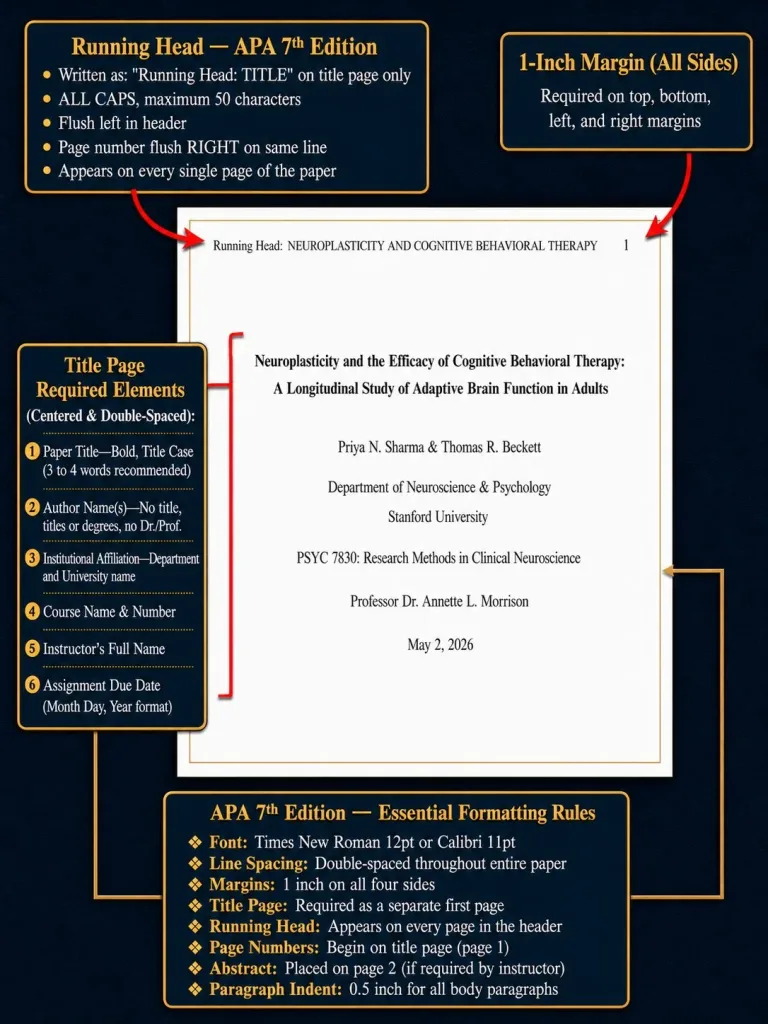
APA Title Page Format Example:
- Title of Paper (centered, bold)
- Author Name (centered)
- Institution Name (centered)
- Course Number and Name (centered)
- Instructor Name (centered)
- Due Date (centered)
- Page Number (flush right in header)
MLA Format Cover Page Example
- No Separate Title Page: MLA typically does not require a separate research paper cover page. Instead, the student’s information is placed at the top of the first page.
- Student Information: The student’s name, instructor name, course name, and due date are aligned at the left margin.
- Paper Title: The title of your paper is centered on the page, directly below the student information.
- No Running Head: Unlike APA format, MLA does not use a running head or page number on the title page. The page number appears at the top-right corner of subsequent pages.
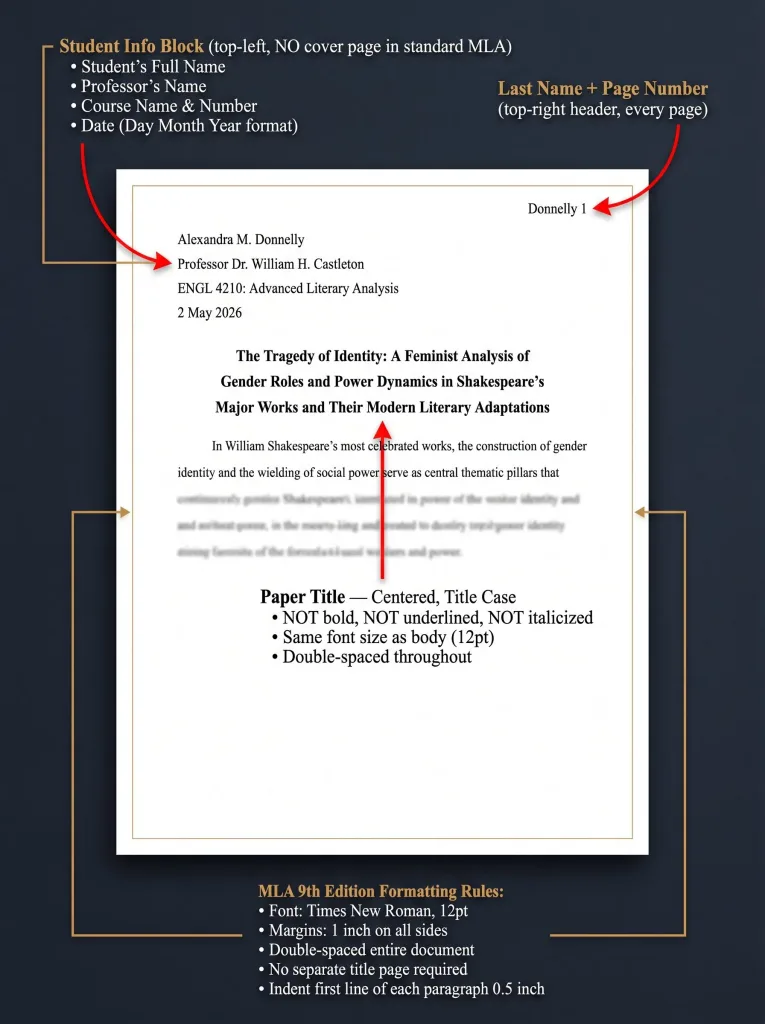
MLA First Page Example:
- Student Name
- Instructor Name
- Course Name
- Due Date
- Title of Paper (centered)
- Page Number (flush right in header, starting from page 1)
Common Mistakes to Avoid When Formatting Your Cover Page
To ensure your research paper cover page meets academic standards, avoid these common mistakes:
- Incorrect Title Formatting:
- The title of your paper should be centered and bold in APA format, but many students forget to bold the title or don’t center it properly. Avoid placing the title at the top of the page with too much spacing above it.
- Improper Font Choices:
- Always use Times New Roman or another readable academic font in 12-point size. Avoid using fonts like Comic Sans or Arial unless specified.
- Failure to Double-Space:
- One of the most common mistakes is forgetting to double-space the content on your title page. The entire page, including the title and other details, should be double-spaced.
- Not Using a Page Template:
- Many students waste time manually formatting their cover page. To save time and ensure accuracy, use templates to get started. These editable templates guide you on where to place the necessary information.
- Misaligned Information:
- Ensure that the text on your cover page is properly aligned. The title should be centered, and the page header should be flush right. Don’t place information at random places on the page.
- Skipping the Page Number:
- The page number is an important detail that should always appear on the title page in APA format. Ensure you insert page numbers starting from the title page.
- Overuse of Abbreviations:
- Using abbreviations like “Prof.” or “Dr.” in the title or the author’s name is not recommended in academic papers. Always write out full terms to maintain a formal tone.
Struggling with Your Research Paper?
Get expert assistance with your research paper writing from Best Dissertation Writers . Our team specializes in providing research paper writing services , ensuring well-structured, high-quality papers tailored to your academic needs. Visit our site to get professional guidance and elevate the quality of your research paper.
Get Professional HelpConclusion: Perfecting Your Research Paper Cover Page Format
A well-crafted research paper cover page is essential as it sets the tone for your entire paper. It provides the first impression, signaling professionalism and attention to detail. Whether you follow APA format or MLA format, adhering to the guidelines provided by your instructor and the respective publication manual is crucial.
Key Elements for a Professional Look:
- Center and Bold the Title: The title of your paper should be clear, centered, and bold to stand out and represent the main focus of your work.
- Use the Right Font: Stick to readable academic fonts like Times New Roman or Arial in 12-point size.
- Indent Correctly: Ensure proper alignment and indentation. In APA format, each paragraph’s first line should be indented.
- Include Necessary Information: Your cover page should include the title of the paper, author’s name, institutional affiliation, course details, instructor’s name, assignment due date, and page number (starting on the new page of the title page).
Use Templates to Guide Your Formatting:
- Editable templates can help ensure consistency and guide you through the formatting process. These customizable templates often include placeholders for sections like author name, institution, and course name, simplifying the task.
Double-Check for Formatting Accuracy:
- Insert Page Numbers: Ensure the page number appears in the header, flush right.
- Running Head: If required, include a running head, especially for professional papers.
- Line Spacing: The entire cover page must be double-spaced, including the title and all details.
- Author Placement: For multiple authors, list them in order of contribution, with the final author appearing last.
Address Other Important Details:
- For papers with multiple authors, clearly identify the corresponding author and ensure the affiliation is included.
- If applicable, include an author note for conflicts of interest, common in professional papers.
References
- How to Write a Research Paper – Cambridge Research Blog – https://cambridge-research.org/blogs/how-to-write-a-research-paper/
- Tips on Writing a Good Research Paper – American Public University – https://www.apu.apus.edu/area-of-study/education/resources/tips-on-writing-a-good-research-paper/
- Writing a Research Paper – NCBI – https://pmc.ncbi.nlm.nih.gov/articles/PMC3907284/
- Research Writing Tips for Students – EBSCO – https://connect.ebsco.com/s/article/Research-Writing-Tips-for-Students?language=en_US