

What is Alteryx? – Key Takeaways
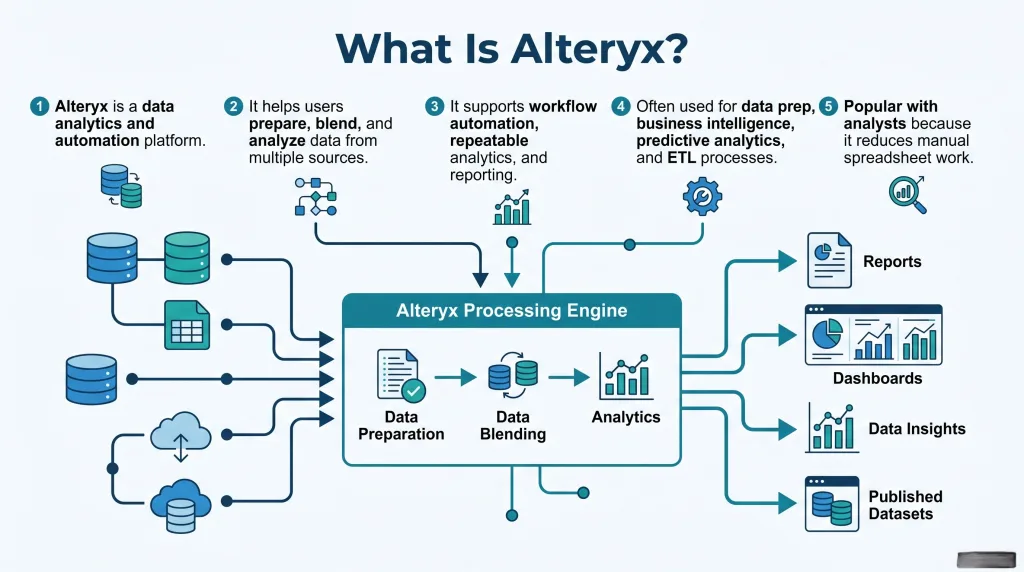
- Alteryx is a data analytics platform that helps users prepare, clean, blend, and analyze data in one place.
- It is designed to reduce manual work by turning repeated data tasks into automated workflows.
- Instead of depending heavily on coding, Alteryx uses a visual drag-and-drop workflow builder that is easier for many analysts to use.
- Alteryx Designer is the main product used to build, test, and manage these workflows.
- It supports key functions such as data preparation, data blending, ETL, reporting, predictive analytics, and workflow automation.
- Alteryx can connect data from multiple sources, including spreadsheets, cloud apps, and databases, making it easier to create one reliable dataset.
- It is often used to prepare clean, structured data for BI tools such as Tableau and Power BI.
- Businesses use Alteryx for recurring reports, dashboard preparation, forecasting, customer analysis, and data science projects.
- One of its biggest strengths is helping teams improve data quality, consistency, and speed without relying on slow manual processes.
- Overall, Alteryx helps analysts and business teams turn raw data into actionable insights faster, more accurately, and with better scalability across reporting and analytics tasks.
What Is Alteryx?
- Alteryx is a modern data analytics platform designed to help people prepare, combine, clean, and analyze data without relying heavily on traditional coding. It gives users a visual workflow environment where they can drag, drop, and connect steps together to solve data problems faster.
- At its core, Alteryx is an analytics software solution built for teams that need to work with complex data workflows in a simpler way. Instead of writing long scripts for every task, users can build repeatable processes with a drag and drop tool that makes data preparation and analysis easier to manage.
- A simple way to understand Alteryx is to think of it as a platform that brings together:
- Data preparation
- Data blending and preparation
- ETL
- Advanced analytics
- Predictive analytics
- Automation
- Visualization support through BI tools
- Alteryx is often used when businesses need to pull data from multiple sources into one place. This may include:
- Excel files
- Cloud apps
- A database
- CRM systems
- ERP tools
- Web files
- Internal reporting platforms
- One of the biggest strengths of the platform is how it helps users connect multiple data sources, clean messy data sets, and transform raw information into something meaningful. This is especially useful when teams deal with manual data, disconnected systems, and inconsistent formatting.
- Alteryx is also known as a strong data analytics tool because it supports both day-to-day reporting and more advanced use cases such as:
- Trend analysis
- Predictive modeling
- Forecasting
- Geographic analysis using location data
- Process optimization
- Customer segmentation
- Many companies view Alteryx as a powerful tool because it supports the full journey from raw data to actionable insights. It helps users analyze data, improve data management, and turn repetitive reporting into efficient data workflows.
- In practical terms, what is Alteryx really about? It is about helping people work smarter with data, reduce a manual process, improve the quality of data, and build scalable processes that can grow with the business.
What Is Alteryx and Why Do Analysts Use Alteryx Today?
- What is Alteryx and why does it matter so much today? The answer is simple: modern businesses create more data than ever, and teams need faster ways to turn that information into decisions. Alteryx helps the modern analyst move from raw numbers to insight without getting stuck in slow, error-prone manual tasks.
- Today’s data analyst often works with reports from finance, sales, operations, marketing, and customer teams. That means they must handle:
- Different file types
- Inconsistent formats
- Missing values
- Duplicate records
- Time-consuming joins across systems
- This is where many professionals use Alteryx. It allows them to:
- Clean messy data
- Merge data from multiple sources
- Build repeatable logic
- Automate workflows
- Deliver outputs to Tableau, Power BI, or other BI tools
- Analysts use Alteryx today because it reduces dependence on manual spreadsheet work. Instead of repeating the same steps every week, they can create workflows that refresh automatically. This replaces manual work with reliable automation.
- Another major reason people ask what is Alteryx is because they want a tool that bridges business users and technical teams. Alteryx sits in a useful middle ground:
- Easier than building everything from scratch in code
- More flexible than basic spreadsheet tools
- More accessible for non-programmers
- Strong enough for advanced analytics and data science
- A common use case is recurring reporting. For example:
- A sales analyst needs to combine CRM exports, regional spreadsheets, and finance records.
- They build one workflow to clean, join, and structure the dataset.
- The output is pushed into Tableau or Power BI for visualization and dashboarding.
- What used to take hours becomes a repeatable process.
- Alteryx is also useful for teams that want more self-service data analytics. Instead of waiting for IT or engineering every time they need a new report, users can build and manage their own data processes in a governed way.
- For many organizations, Alteryx is no longer just a software question. It is a strategy question. It represents a shift toward faster analysis, stronger business intelligence, and better decision-making across departments.
What Is Alteryx Designer? A Beginner-Friendly Overview
- What is Alteryx Designer? Alteryx Designer is the main desktop product where users build workflows visually. It is the workspace where data is brought in, transformed, analyzed, and prepared for reporting or advanced modeling.
- If you are new to the platform, Alteryx Designer can be understood as the place where you do the hands-on work. It gives you a canvas where you connect different steps using tools in Alteryx. Each tool performs a task, and together those tools form a complete workflow.
- The beginner-friendly appeal of Alteryx Designer comes from its visual structure:
- You import data
- You drag in tools
- You connect them in sequence
- You run the process
- You review outputs and refine the logic
- This makes it much easier for users who do not want to rely fully on coding. While Alteryx can work alongside code when needed, its core value is that it lets people solve many data problems through building workflows visually.
- New users often start with simple tasks such as:
- Filtering rows
- Renaming fields
- Removing duplicates
- Joining tables
- Reshaping columns
- Creating calculated fields
- Preparing outputs for a dashboard
- Over time, users expand into more advanced work such as:
- Predictive modeling
- Scoring models
- Spatial analysis with location data
- Working with big data
- Running machine learning processes
- Supporting data science use cases
- A helpful way to explain Alteryx to beginners is to say that Designer acts like a visual problem-solving studio for data. It simplifies data manipulation, supports data blending and preparation capabilities, and makes it easier to automate data analytics processes.
- The broader Alteryx ecosystem may also include products such as Alteryx Server and Designer Cloud:
- Alteryx Server helps teams share, schedule, and govern workflows across the business.
- Designer Cloud supports cloud-based workflow creation and collaboration.
- Together, they help organizations scale beyond individual desktop use.
- For a beginner, the biggest benefit is confidence. Alteryx Designer helps users move from raw files to meaningful outputs in a structured way, without making the work feel overly technical or intimidating.
What Are the Core Features of Alteryx?
- When people ask about the core features of Alteryx, they usually want to know what makes the platform stand out from other tools. The answer is that Alteryx combines flexibility, speed, and accessibility across the full data workflow.
- The core features of Alteryx include:
- Visual workflow building
- Users can build logic step by step using a visual workflow canvas.
- This makes complex processes easier to understand, review, and improve.
- It also supports collaboration because workflows are easier to follow than scattered manual steps.
- Data preparation
- Alteryx is widely known for how it simplifies data preparation.
- It helps clean, structure, standardize, and enrich messy information.
- This is one of the most important parts of any analysis because poor input often leads to poor output.
- Data blending and preparation
- A major strength is its ability to combine data from spreadsheets, a database, cloud systems, and other data sources.
- This makes data blending and preparation much faster and more reliable.
- ETL capability
- Teams can perform ETL by extracting data, transforming it, and loading it into downstream systems or files.
- This is useful when preparing structured outputs for reporting, compliance, or operational processes.
- Advanced analytics and predictive analytics
- Alteryx supports predictive analytics, predictive modeling, and more advanced methods used in data science.
- It can help users move beyond descriptive reporting into forecasting and deeper analysis.
- Automation
- Users can automate data, reduce repetitive tasks, and standardize logic.
- This improves speed, consistency, and scalability across recurring reporting cycles.
- Integration with BI and reporting tools
- Outputs can feed into Tableau, Power BI, and other business intelligence environments.
- This makes Alteryx a strong partner for data analytics and visualization platform strategies.
- Scalability and collaboration
- With Alteryx Server, teams can schedule jobs, share workflows, and improve governance.
- This helps businesses move from one-person analysis to shared operational workflows.
- Visual workflow building
- In short, the core features of Alteryx are built to help users prepare data, improve the quality of data, support advanced analytics, and generate faster insights from complex sources.
Struggling with Your Data Analysis or Dissertation Statistics?
Get expert assistance with your data analysis projects or dissertation statistics from Best Dissertation Writers . Our team specializes in providing dissertation statistics help , ensuring accurate, well-analyzed results tailored to your research needs. Visit our site to get professional guidance and elevate the quality of your data-driven projects.
Get Professional HelpHow Alteryx Helps You Automate Repetitive Data Workflows
- One of the most practical answers to what is Alteryx is that it helps teams automate work they repeat again and again. This matters because repetitive reporting is one of the biggest drains on analyst time.
- Many businesses still rely on a manual process for recurring tasks such as:
- Downloading reports from different systems
- Copying data into spreadsheets
- Fixing formats by hand
- Combining files every week
- Updating formulas
- Sending results to stakeholders
- Alteryx changes this by allowing users to create workflows once and run them repeatedly. Instead of rebuilding the same logic every time, the workflow handles it for them.
- Here is how Alteryx helps automate workflows in a real-world use case:
- A finance data analyst receives weekly files from sales, operations, and accounting.
- The files contain inconsistent naming, duplicate values, and different date formats.
- The analyst builds a workflow in Alteryx Designer to clean the data, standardize fields, join sources, and prepare a final report.
- The result is a repeatable process that can automate data preparation every week.
- This kind of automation improves business performance in several ways:
- Less time spent on manual data cleanup
- Fewer human errors
- Faster turnaround for reports
- More reliable outputs
- More time for analysis instead of formatting
- It also helps organizations automate data analytics at scale. Rather than using staff time to repeat the same steps, analysts can focus on:
- Finding trends
- Interpreting results
- Supporting strategy
- Delivering actionable insights
- Another strong use case involves data from multiple sources. Alteryx can connect and standardize those sources into one clean flow, which is especially helpful in organizations with fragmented systems. This is one reason it is often discussed in “Alteryx vs other tools” comparisons.
- Whether the goal is to prepare dashboards, refresh KPI reports, or support business intelligence, Alteryx helps teams build efficient data workflows that are more stable, scalable, and easier to maintain.
Key Benefits of Alteryx for Every Data Analyst
- The benefits of Alteryx are especially clear for the modern data analyst, who is expected to move quickly, work across departments, and produce reliable insight from growing volumes of data.
- One of the biggest benefits of Alteryx is speed.
- Tasks that used to take hours can often be done in minutes once the workflow is built.
- This is valuable for recurring reports, audits, forecasting, and dashboard preparation.
- Another key benefit is usability.
- Because the platform relies on a drag and drop tool model, it lowers the barrier for users who are less comfortable with heavy coding.
- That makes it a valuable tool for both technical and less technical analysts.
- Alteryx also improves consistency.
- A saved workflow means the same logic can be repeated the same way every time.
- This reduces risk, supports governance, and improves trust in outputs.
- The benefits of Alteryx also include stronger analysis.
- Users can go beyond simple spreadsheet work and move into predictive analytics, machine learning, and more advanced exploration.
- This makes the platform relevant not only for a data analyst, but also for a data scientist.
- It strengthens reporting ecosystems too.
- Alteryx prepares cleaner data for Tableau, Power BI, and other BI environments.
- That leads to better visualization, clearer dashboards, and stronger gain insights outcomes.
- Businesses also value Alteryx because it supports:
- Better data management
- Faster data manipulation
- Easier handling of multiple data sources
- Improved data preparation
- More scalable data workflows
- For teams exploring Alteryx AI, cloud collaboration, or operational workflow scaling, the platform continues to expand as a powerful data analytics solution. It works well across reporting, data science, and automation needs.
- Ultimately, what is Alteryx for today’s business user? It is a data analytics software solution that helps professionals analyze data, reduce manual effort, and make better decisions faster.
- And for anyone still asking what is Alteryx, the simplest answer is this: it is a practical, business-friendly analytics platform built to automate, prepare, and transform data into insight. That is exactly why so many teams continue to use Alteryx as a core part of their modern analytics stack.
Top Alteryx Use Case Examples in Business and Data Science
- One of the easiest ways to understand Alteryx is to look at how companies actually use it in day-to-day work. Alteryx is not just another analytics software option. It is a practical data analytics platform built to help teams clean, combine, and analyze data faster through a visual workflow approach.
- A common use case is data preparation for recurring business reports.
- Many teams receive files from finance, sales, operations, and marketing every week.
- Those files often contain duplicate entries, inconsistent column names, missing values, and formatting issues.
- With Alteryx Designer, a data analyst can build a repeatable workflow that cleans the raw inputs, standardizes fields, and prepares a final dataset for reporting.
- This helps teams automate data cleanup and reduce time spent on a manual process.
- Another strong use case is data blending and preparation across departments.
- Businesses often need data from multiple sources, such as spreadsheets, cloud apps, and a central database.
- Alteryx makes it easier to bring those multiple data sources together into one structured model.
- This is especially useful when an analyst needs one version of truth for executive reporting, dashboards, or monthly reviews.
- Alteryx is also widely used for dashboard support in business intelligence environments.
- Teams often prepare outputs for Tableau, Power BI, and other BI tools.
- In this setup, Alteryx acts as the engine for data preparation and analysis, while Tableau or Power BI handles the final visualization layer.
- That makes Alteryx a strong partner in any data analytics and visualization platform strategy.
- In data science, Alteryx supports more advanced work beyond reporting.
- A data scientist can use it for predictive analytics, predictive modeling, and even some machine learning workflows.
- It is especially helpful when preparing training data, validating inputs, and shaping data before models are built.
- This makes Alteryx valuable in both business reporting and advanced analytics projects.
- Another high-value use case is customer and sales analysis.
- Teams can combine CRM exports, transaction history, product data, and regional details.
- From there, they can analyze data to identify buying patterns, segment customers, forecast demand, and generate actionable insights.
- For companies trying to improve decision-making speed, this is where the benefits of Alteryx become very visible.
- Spatial and location data analysis is another area where the platform stands out.
- Businesses can study store performance, territory coverage, delivery routes, or market expansion opportunities.
- This is one of the more specialized tools in Alteryx that expands its value beyond basic reporting.
- For teams handling big data, Alteryx can also support scalable data workflows.
- Instead of relying on disconnected files and repeated spreadsheet tasks, users can build structured processes that are easier to review, improve, and share.
- This is one reason people exploring Alteryx often see it as a bridge between everyday reporting and enterprise-level analysis.
How to Use Alteryx for Data Preparation, Blending, and Reporting
- If someone asks what is Alteryx in practical terms, the best answer is that it helps users take raw data and turn it into reporting-ready outputs through a clear step-by-step process.
- The first step is connecting your data sources.
- You can pull in spreadsheets, CSV files, cloud data, and tables from a database.
- This gives users one workspace for handling data from multiple sources instead of jumping between tools.
- For many teams, this is the beginning of better data management and more reliable data processes.
- The second step is data preparation.
- This is where you clean columns, fix field types, remove duplicates, handle null values, and standardize formats.
- Alteryx is widely known because it simplifies data preparation in a way that feels more visual and less technical.
- Instead of complex scripts, users can rely on a drag and drop tool environment to complete tasks that would otherwise require extensive coding.
- The third step is data blending and preparation.
- After cleaning the files, users can join, union, and reshape their data sets.
- This is useful when combining customer lists, financial records, campaign data, or operational logs into one reporting model.
- These data blending and preparation capabilities are among the most practical core features of Alteryx.
- The fourth step is transformation and logic building.
- Users can calculate metrics, filter records, create custom classifications, and structure fields for reporting.
- This stage is where teams often create workflows that reflect business logic clearly and consistently.
- It also improves the quality of data before the information moves into dashboards or downstream systems.
- The fifth step is reporting output.
- Once the data is ready, the workflow can send results to files, dashboards, or downstream systems.
- Many teams use Alteryx to prepare data for Tableau, Power BI, or internal BI reporting.
- In this way, Alteryx becomes the preparation engine behind cleaner reporting and better business intelligence.
- Over time, users can automate workflows so that reporting becomes repeatable.
- A process that once involved downloading files, cleaning them by hand, checking formulas, and copying results can now run as a structured workflow.
- That reduces manual data, removes repetitive manual work, and creates more efficient data workflows.
- Teams that need broader deployment can also scale through Alteryx Server or Designer Cloud.
- Alteryx Server helps organizations share, govern, and schedule workflows.
- Designer Cloud supports more flexible cloud-based workflow development.
- Together, they help businesses move from one-person analysis to collaborative, enterprise-ready automation.
- This is why so many professionals who ask what is Alteryx quickly see it as more than a simple data analytics tool. It is a platform for cleaner reporting, stronger ETL, and faster insight generation.
Alteryx Designer vs Traditional Analytics Software
- A useful way to explain Alteryx is to compare Alteryx Designer with traditional data analytics software.
- Traditional analytics tools often focus on one part of the process.
- Some are strong for reporting and dashboarding.
- Others are built mainly for statistical analysis.
- Some require deeper coding knowledge before users can get value.
- Alteryx, by contrast, combines preparation, transformation, and advanced analytics in one environment.
- Alteryx Designer stands out because of its visual workflow model.
- Users can see each step of the logic from input to output.
- That makes building workflows easier for business users and easier to review for technical teams.
- In many organizations, this supports self-service data analytics without losing structure.
- Compared with traditional spreadsheet-based work, Alteryx is more scalable.
- Spreadsheet models can become difficult to audit, easy to break, and hard to repeat.
- Alteryx makes it easier to automate workflows and preserve business logic in a clearer way.
- This is one of the most practical benefits of Alteryx for any modern data analyst.
- Compared with dashboard tools such as Tableau or Power BI, Alteryx serves a different role.
- Tableau and Power BI are excellent for visualization and dashboard delivery.
- Alteryx is stronger in data blending and preparation, transformation, and perform ETL tasks before the data reaches a dashboard.
- That is why many teams use these tools together rather than treating them as direct replacements.
- Compared with pure coding environments, Alteryx offers speed and accessibility.
- A programmer may still prefer code for very custom workflows.
- But many business users need a faster way to clean and combine data without heavy scripting.
- Alteryx provides that balance, making it a valuable tool for analysts who want flexibility without a steep technical barrier.
- In many Alteryx vs traditional tool comparisons, the difference comes down to workflow maturity.
- If a team needs structured data preparation and analysis, repeatable ETL, and easier collaboration, Alteryx often has the advantage.
- If a team only needs charting, they may rely more on standard BI tools.
- If they need full custom engineering, code-heavy tools may still play a role.
- So, when people ask what is Alteryx, it helps to say this clearly: it is not just a reporting layer. It is a powerful tool for preparing, transforming, and automating data before deeper analytics or reporting begins.
Alteryx Designer vs Traditional Analytics Software
| Category | Alteryx Designer | Traditional Analytics Software |
|---|---|---|
| Approach | Uses a visual workflow interface to build data processes step by step. | Often focuses on only one part of analytics, such as reporting, charting, or statistical analysis. |
| Ease of Use | More beginner-friendly for analysts because it uses drag-and-drop tools instead of heavy coding. | May require more technical knowledge, especially when advanced setup or scripting is needed. |
| Workflow Visibility | Shows every stage of the process clearly from data input to output. | Logic can be harder to follow, especially when spread across spreadsheets, formulas, or separate tools. |
| Data Preparation | Strong in cleaning, blending, transforming, and preparing data from multiple sources. | Often limited or dependent on extra tools for full data preparation tasks. |
| Automation | Built to automate repeatable workflows and reduce manual work. | May rely more on repeated manual processes or separate automation tools. |
| Scalability | Better for repeatable and structured workflows that need to grow across teams. | Can become difficult to manage when processes become more complex or frequent. |
| Use with BI Tools | Works well with Tableau and Power BI by preparing clean, reporting-ready data. | Some tools are stronger in dashboarding but weaker in data blending and ETL. |
| Best Use Case | Best for data preparation, workflow automation, ETL, and advanced analytics support. | Best for simpler reporting, dashboard creation, or isolated analytics tasks. |
| Flexibility | Offers a balance between usability and advanced analytical capability. | May be either too basic for complex workflows or too technical for non-programmers. |
| Overall Value | Ideal for teams that want efficient, repeatable, and scalable data workflows. | Better suited for narrower analytics needs rather than end-to-end workflow management. |
When to Use Alteryx for Automation, Analytics, and Data Science Projects
- You should use Alteryx when your team is spending too much time on repetitive preparation, cleanup, and reporting tasks.
- It is a strong choice when:
- You need to combine multiple data sources
- You want to reduce a repeated manual process
- You need to automate data analytics
- You want cleaner inputs for predictive analytics
- You are trying to improve the speed and quality of data workflows
- It is especially useful for reporting teams.
- If your team prepares the same KPI packs, forecasts, or operational reports every week, Alteryx can help automate that flow.
- This gives analysts more time to gain insights instead of repeating cleanup steps.
- It is also a strong fit for hybrid analytics teams.
- Many organizations sit between business reporting and data science maturity.
- They need a platform that supports both day-to-day analysis and more advanced use cases such as predictive modeling or machine learning preparation.
- In this space, Alteryx can act as a flexible analytics platform.
- Another good time to use Alteryx is when data quality issues are slowing decisions.
- Poor source files, inconsistent fields, and fragmented systems often create delays.
- Alteryx helps standardize data manipulation, improve the quality of data, and support more confident reporting.
- Teams also consider Alteryx when exploring newer capabilities such as Alteryx AI and broader workflow scaling.
- This makes the platform relevant not only for today’s reporting needs, but also for longer-term automation strategies.
- In simple terms, what is Alteryx most useful for? It is most useful when data work is becoming too repetitive, too manual, or too fragmented to manage efficiently with basic tools alone.
Common Challenges and Best Practices When You Use Alteryx
- Like any powerful data analytics solution, Alteryx works best when it is used with clear structure and good habits.
- One common challenge is overbuilding workflows.
- New users sometimes create overly complex flows that are hard to maintain.
- Best practice: keep workflows modular, label key steps, and document business logic clearly.
- Another challenge is poor input quality.
- Even the best data analytics tool cannot fully solve bad source data on its own.
- Best practice: validate incoming files, check field types, and create rules for standard formatting early in the workflow.
- A third challenge is governance.
- As more users create workflows, organizations need standards for naming, ownership, scheduling, and review.
- Best practice: use Alteryx Server where possible to manage shared assets and improve consistency across teams.
- Teams may also struggle when they expect Alteryx to replace every other platform.
- In reality, it works best as part of a broader stack that may include Tableau, Power BI, databases, and other reporting tools.
- Best practice: define where Alteryx adds the most value in data preparation, ETL, and automation.
- Some users also compare it unfairly to pure coding tools.
- Alteryx is excellent for structured, repeatable, visually built processes.
- Best practice: use it where a drag and drop tool adds speed and clarity, and combine it with code only when deeper customization is required.
- If you want long-term success when you use Alteryx, focus on:
- Clean design
- Reusable workflows
- Strong documentation
- Consistent inputs
- A clear handoff between preparation, analysis, and reporting
Final Thoughts: What Is Alteryx and Is It the Right Analytics Software for You?
- By this point, the answer to what is Alteryx should be much clearer. It is a modern analytics software solution that helps teams prepare, transform, and automate data in a structured, user-friendly way.
- If your team struggles with scattered data sources, repeated reporting, slow manual work, or inconsistent data preparation, Alteryx can be a very strong fit.
- If you need a platform that supports reporting, advanced analytics, workflow automation, and cleaner outputs for business intelligence, it offers real value.
- For many organizations, what is Alteryx comes down to one simple idea: it is a smarter way to turn raw data into reliable insight.
- It is especially well suited for:
- The modern data analyst
- Teams that want self-service data analytics
- Businesses that need better data blending and preparation
- Users who want to reduce heavy manual process work
- Organizations looking for a more scalable data analytics software approach
- So, what is Alteryx and is it the right choice for you?
- If you need a flexible, visual, and scalable way to analyze data, improve data processes, and automate workflows, the answer may be yes.
- If you want a platform that sits between spreadsheet work and highly technical engineering, Alteryx is often an excellent middle ground.
- And if your goal is better reporting, stronger automation, and faster actionable insights, it is easy to see why so many teams continue to use Alteryx.
References
- Data Analysis Guide – Georgetown University Library – https://guides.library.georgetown.edu/data-analysis
- 5 Key Reasons Why Data Analytics Is Important for Business – University of Pennsylvania – https://lpsonline.sas.upenn.edu/features/5-key-reasons-why-data-analytics-important-business
- 10 Easy Data Analysis Methods and Techniques – Isenberg School of Management – https://iconnect.isenberg.umass.edu/blog/2024/06/06/10-easy-data-analysis-methods-and-techniques/
- Using Data for Analysis – Georgia Tech Library – https://libguides.library.gatech.edu/usingdata/analyzing-data