

What is QlikView? – Key Takeaways
- QlikView is a leading business intelligence (BI) and data visualization tool that enables users to analyze and visualize data from various sources.
- Developed by Qlik, founded by Björn Berg and Carsten Lund in the 1990s, QlikView was one of the first to incorporate associative in-memory technology, revolutionizing how users interact with data.
- Unlike traditional BI tools, QlikView allows users to perform data discovery and explore relationships between different datasets with flexibility.
- The platform creates an interactive environment where data models are driven by users, not IT professionals, allowing for greater flexibility in how data is accessed and explored.
- QlikView’s data visualization tools allow users to create interactive dashboards and reports, making it easier for businesses to interpret and act on their data.
- Its ability to process data in real-time ensures that the insights users gain are always up-to-date and actionable.
- QlikView’s real-time data processing ensures businesses can make faster decisions based on the most current information available.
- QlikView is often considered a business intelligence platform because it integrates easily with multiple data sources, offering a comprehensive suite of BI tools.
- It helps businesses aggregate data from various databases and systems, creating a unified platform for data analysis and sharing insights across teams.
- The QlikView Server allows for the secure sharing of interactive dashboards, enabling users to explore data from different sources effectively.
- QlikView enables users to create interactive dashboards that display visualizations like graphs, charts, and tables, helping businesses uncover valuable insights more efficiently.
- With its interactive dashboards, QlikView allows users to drill down into data and explore various visual representations of their business metrics.
What Are the Key Features of QlikView?
- Associative In-Memory Engine
- One of the most powerful features of QlikView is its associative in-memory technology. Unlike traditional BI tools that require multiple data queries, QlikView stores data in memory, allowing users to interact with the data quickly and intuitively.
- This associative engine lets users explore data freely without being confined to pre-defined queries. As users make selections, QlikView automatically updates all connected data and visualizations, making it easier to analyze data from multiple angles.
- Interactive Dashboards and Reports
- QlikView allows users to create interactive dashboards and reports, giving them a clear view of their data. These visualizations are dynamic, and users can drill down into the details to explore different levels of data.
- The interactive nature of these dashboards means that users are not restricted to static reports and can explore data in a way that suits their specific needs.
- Data Integration from Multiple Sources
- QlikView allows users to connect and analyze data from different data sources, including traditional databases, data models, and even cloud-based platforms.
- It supports ETL (Extract, Transform, Load) processes, allowing businesses to integrate data from multiple systems seamlessly. This makes QlikView an invaluable tool for organizations with diverse data systems.
- QlikView helps to consolidate data from multiple sources, providing a single, unified view of business metrics across different platforms.
- Real-Time Data Processing
- QlikView enables real-time data processing, which means businesses can access live data without delays. This is particularly useful for industries like supply chain management, where fast decision-making is crucial.
- The ability to process fast data ensures that users are working with the most current and accurate insights.
- QlikView Publisher
- The QlikView Publisher is a tool that manages the distribution of QlikView documents. It allows businesses to control user access and schedule the distribution of reports and dashboards to different stakeholders across the organization.
- This feature is particularly important for large enterprises where multiple teams may need access to the same data, but with different levels of permissions.
- Data Modeling Capabilities
- QlikView provides users with powerful data modeling capabilities. This allows businesses to create sophisticated data models that can handle large amounts of information from multiple data sources.
- These data models are flexible, making it easier for users to adjust them as business needs change. QlikView developers can build complex data models that ensure seamless data integration and analysis.
- Qlik Sense Integration
- QlikView works seamlessly with Qlik Sense, another product from Qlik, which provides an even more user-friendly interface for creating data visualizations. While QlikView is known for its deep data analysis capabilities, Qlik Sense is optimized for self-service data visualization, making it easier for non-technical users to create their own interactive reports.
How to Install QlikView: A Step-by-Step Guide
1. Download QlikView
- Visit the official Qlik website: Start by navigating to the official Qlik website where you can download the QlikView application.
- Choose the appropriate version: Depending on your needs, select the version of QlikView you want to download:
- QlikView Personal Edition: Ideal for individual use with limited functionality.
- QlikView Server: Best for business or enterprise use, enabling centralized access and management for multiple users.
- Download the installer: Click on the download link for your chosen version, and the installation file will begin downloading to your system.
2. Run the Installer
- Locate the installer file: Once the download is complete, navigate to the location where the installer file was saved (typically the “Downloads” folder).
- Start the installation process: Double-click the installer file to begin the installation process.
- Verify system requirements: Ensure that your system meets the necessary requirements for QlikView to run properly. These requirements will be listed on the download page and typically include certain operating systems (e.g., Windows) and hardware specifications.
3. Complete the Installation Process
- Select components to install: During the installation, you will be prompted to choose which components of QlikView you want to install. The options typically include:
- QlikView Server: For enterprise-level deployments.
- QlikView Publisher: For distributing and managing QlikView documents.
- QlikView Client: For individual users to interact with QlikView data.
- Follow the on-screen prompts: Continue through the installation process by following the on-screen instructions. Make sure to read the license agreement and accept it before proceeding.
4. Set Up User Access
- Configure user roles and permissions: After installation, open the QlikView Management Console (QMC) to configure user roles, permissions, and access levels.
- Control access to dashboards and reports: Based on your organization’s structure, assign permissions to users, ensuring that only authorized individuals can access certain dashboards or sensitive data.
5. Launch QlikView
- Open the application: Once installation is complete, locate and open the QlikView application from your desktop or start menu.
- Begin using QlikView’s tools: Start exploring and analyzing data using QlikView’s interactive dashboards and visualization tools. You can now create custom reports and gain insights from your data.
By following these steps, you can successfully install QlikView and begin leveraging its powerful analytics capabilities to enhance business decision-making. Whether you’re working individually or as part of a larger organization, QlikView provides a versatile and robust platform for data analysis.
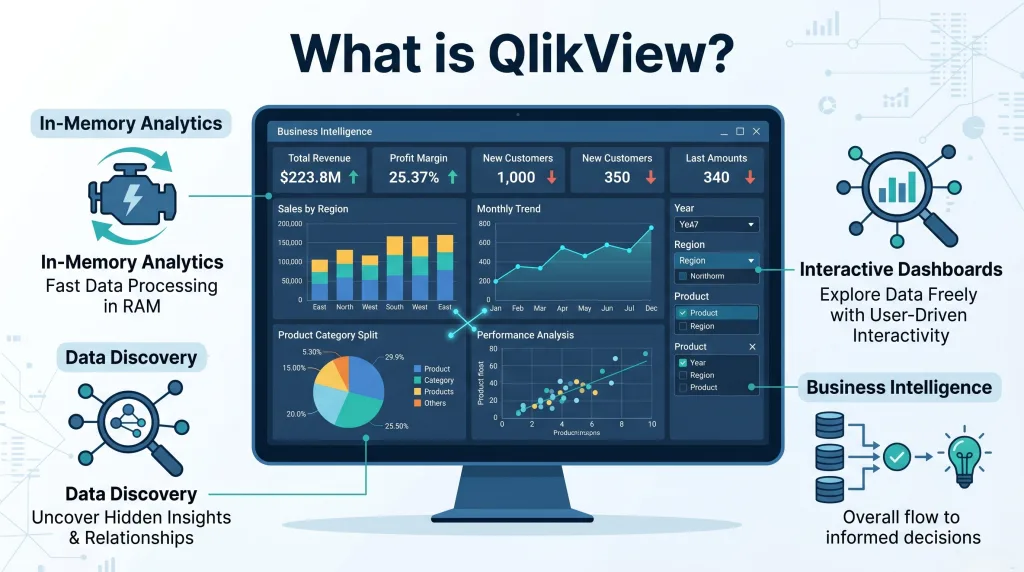
How Does QlikView Work with Associative In-Memory Technology?
- In-Memory Data Processing Engine
- QlikView uses an in-memory data processing engine, meaning that it stores large volumes of data directly in the system’s memory (RAM) instead of relying on traditional databases.
- Benefit: This significantly speeds up data retrieval and processing times since accessing data from memory is much faster than querying data from external databases. As a result, users can get real-time access to data without delays, enabling immediate analysis.
- Real-Time Data Access
- By using in-memory storage, QlikView enables real-time data analysis.
- Benefit: Data is always up-to-date because it’s being processed instantly in memory, allowing users to perform analysis on live data without needing to refresh or wait for new queries to run. This makes QlikView ideal for industries where real-time decisions are critical, such as finance, logistics, or supply chain management.
- Associative Engine for Flexible Data Exploration
- QlikView features a powerful associative engine that distinguishes it from traditional BI tools.
- Benefit: Users can explore data freely without having to follow predefined queries or paths. This engine enables users to make selections on interactive dashboards, and the entire data model is automatically updated, revealing new insights and relationships between data points that might not have been apparent initially.
- Interactive Dashboards with Instant Data Updates
- As users make selections on dashboards, the associative engine updates the data in real-time across all related visualizations and metrics.
- Benefit: This provides a seamless interactive experience, where users can drill deeper into specific data points and explore how one piece of data affects others. For example, selecting a particular product or time frame on a visualization will update the related data immediately, making the entire dashboard context-aware and dynamic.
- Freedom from Predefined Queries
- Unlike many traditional BI tools that restrict users to predefined reports and queries, QlikView allows users to interact with data without limitations.
- Benefit: Users are not confined to fixed paths or reports; they can explore the data in any way they choose, asking new questions as they go along. This is especially useful for uncovering hidden trends or relationships that were not part of initial data models or assumptions.
- Rapid Data Processing Across Multiple Data Sources
- QlikView’s in-memory processing ensures that it can handle data from multiple sources quickly and efficiently.
- Benefit: Regardless of whether the data is coming from a single source or multiple databases, users can seamlessly analyze it all together. This is ideal for businesses dealing with complex data environments that need to combine information from various departments, systems, or even external platforms.
- Instant Drill-Down Capabilities
- With in-memory technology, users can drill down into details almost instantly, without waiting for reports to be generated or data to load.
- Benefit: This allows for quick, deep dives into the data, enabling users to uncover specific insights within a few seconds, rather than waiting for traditional batch processing or external queries.
- Associative Data Relationships
- The associative engine allows users to visualize relationships between different data points in a way that traditional query-based BI tools do not.
- Benefit: This leads to better data discovery, as users can identify unexpected correlations and relationships across data sets without the need for complex queries. It makes it easier to understand how data is interconnected, helping to uncover insights that may otherwise be overlooked.
- Dynamic Data Model Updates
- The associative engine ensures that when a user interacts with one part of the data (e.g., selecting a particular region, time frame, or metric), the entire model is updated dynamically to reflect this selection.
- Benefit: This creates a continuous feedback loop, where every action leads to immediate changes in data visualizations, empowering users to explore different scenarios or perform what-if analysis effortlessly.
- Support for Multiple Data Sources
- QlikView enables the combination and analysis of data from multiple sources—whether it’s data from databases, spreadsheets, web services, or cloud applications.
- Benefit: This flexibility allows businesses to integrate a wide variety of data sources into one cohesive analysis, providing a more comprehensive view of their operations or performance metrics.
- Faster Decision-Making
- With all of these capabilities combined—in-memory data processing, real-time updates, and the ability to explore data dynamically—QlikView provides faster insights for decision-makers.
- Benefit: Businesses can make decisions in real-time, using accurate, up-to-date data, which is critical for maintaining a competitive edge in fast-paced environments.
Struggling with Your Data Analysis or Dissertation Statistics?
Get expert assistance with your data analysis projects or dissertation statistics from Best Dissertation Writers . Our team specializes in providing dissertation statistics help , ensuring accurate, well-analyzed results tailored to your research needs. Visit our site to get professional guidance and elevate the quality of your data-driven projects.
Get Professional HelpWhat Analytics Capabilities Does QlikView Offer?
QlikView provides a wide range of analytics capabilities that enable users to conduct deep, actionable analysis on their data. These capabilities are designed to help businesses gain a more comprehensive understanding of their data, leading to better-informed decisions. 1. Advanced Analytics
- QlikView is equipped with advanced analytics features that enable users to perform complex analyses such as trend analysis, regression analysis, and time series analysis.
- Trend analysis allows users to track changes in data over time, providing insights into patterns and behaviors.
- Regression analysis helps to understand relationships between variables, allowing businesses to predict outcomes based on past trends.
- Time series analysis enables users to examine data points collected at regular intervals, making it easier to forecast future trends based on historical data.
- QlikView’s capabilities support both structured data (like spreadsheets and databases) and unstructured data (such as logs or text files), ensuring that users can analyze diverse data sources for a more holistic view of their business performance.
2. Data Discovery
- QlikView enables users to perform data discovery, allowing them to explore data from various perspectives.
- Through the associative engine, users can identify hidden correlations and trends within data that might not be immediately obvious with traditional BI tools.
- The associative model enables data from different sources to be brought together in a single platform, helping users uncover relationships between disparate datasets. This helps users to discover new insights and patterns that can drive business improvements.
3. Visualization Tools
- One of the most powerful features of QlikView is its visualization tools. Users can create a variety of visualizations, ranging from simple bar charts and line graphs to more complex visualizations such as heat maps and scatter plots.
- These visualizations are interactive and customizable, enabling users to modify them to meet their specific needs. For example, users can adjust colors, add labels, or change chart types to display data in the most useful format.
- The use of intuitive visual discovery allows users to quickly spot patterns, trends, and outliers in large datasets, making it easier to identify actionable insights and facilitate better decision-making.
4. Predictive Analytics
- QlikView also integrates with advanced predictive analytics tools, enabling users to leverage historical data to predict future trends.
- By analyzing past data patterns, businesses can forecast outcomes, such as sales growth, customer behavior, or market trends, allowing them to take proactive actions before trends fully emerge.
- This capability is particularly useful in areas such as inventory management, financial forecasting, and marketing, where anticipating future developments can help companies stay ahead of the competition.
QlikView’s suite of analytics tools—including advanced analytics, data discovery, visualizations, and predictive analytics—make it a powerful solution for businesses seeking to transform their data into valuable insights and drive smarter decision-making.
How Can QlikView Enhance Business Intelligence?
- QlikView as a Business Intelligence Tool
- QlikView consolidates data from multiple sources (e.g., databases, cloud platforms, spreadsheets) into a single platform.
- It offers actionable insights that help businesses improve decision-making by providing a unified view of their data.
- Real-Time Analytics for Better Decision-Making
- QlikView provides real-time analytics, ensuring that businesses always work with up-to-date data.
- Decision-makers can react immediately to changes in metrics, enhancing agility and responsiveness.
- Interactive Dashboards and Reports
- The interactive nature of QlikView’s dashboards allows users to drill down into data points for detailed analysis.
- This interactivity helps identify problems and opportunities quickly, enabling data-driven decisions.
- Analyzing Data from Multiple Sources
- QlikView can analyze data from various sources simultaneously, which is crucial for organizations with complex data structures.
- It helps align strategies across departments by providing a comprehensive view of business performance.
- Speed and Efficiency with In-Memory Processing
- QlikView uses in-memory data processing, allowing for faster access to data and real-time insights.
- Unlike traditional BI tools that rely on slow database queries, in-memory processing provides greater speed and efficiency, enabling businesses to make timely decisions.
- Enhanced Collaboration
- Interactive dashboards can be shared across teams, ensuring that all departments have access to the same real-time insights for better alignment on business goals.
Conclusion: Why QlikView is Essential for Advanced Analytics
- QlikView is a powerful business intelligence tool that helps organizations analyze data more efficiently and gain actionable insights. By leveraging associative in-memory technology, QlikView allows users to explore data without being confined to rigid data models or queries.
- With its extensive features and components, such as interactive dashboards, data integration from multiple sources, and real-time data processing, QlikView is essential for businesses looking to enhance their business intelligence and data visualization efforts.
- Whether you are working with small datasets or large, complex data structures, QlikView enables users to uncover insights that can drive better decision-making and improve business performance.
References
- Data Analysis Guide – Georgetown University Library – https://guides.library.georgetown.edu/data-analysis
- 5 Key Reasons Why Data Analytics Is Important for Business – University of Pennsylvania – https://lpsonline.sas.upenn.edu/features/5-key-reasons-why-data-analytics-important-business
- 10 Easy Data Analysis Methods and Techniques – Isenberg School of Management – https://iconnect.isenberg.umass.edu/blog/2024/06/06/10-easy-data-analysis-methods-and-techniques/
- Using Data for Analysis – Georgia Tech Library – https://libguides.library.gatech.edu/usingdata/analyzing-data