

Citation Management Software: Zotero, Mendeley and EndNote Compared
 By Dr. Robertson Prime, Research Fellow
Updated November 25, 2026
16 min read
About 3,300 words
Citation management software is a program that collects, stores and organizes your references, then inserts citations and builds your bibliography in the citation style you need. For a literature review, where you may read and cite dozens or hundreds of sources, it is the simplest way to keep track of your sources and avoid citation errors.
This guide explains what reference management software does, compares the three best-known options, Zotero, Mendeley and EndNote, and helps you choose one. It then shows you, step by step, how to set up a reference manager and use it through your whole research workflow, from the first database search to the final draft.
- The basics: what citation management tools do, and why they save time and marks in a literature review, thesis or dissertation.
- The comparison: Zotero vs Mendeley vs EndNote, with costs, storage, word processor plugins and the best use for each.
- The method: a step-by-step setup guide, tips for organizing references and the most common mistakes students make with a reference manager.
On this page
Key takeaways
- Citation management software captures references, stores PDFs and formats citations for you.
- Zotero is free and open source, Mendeley is free with an Elsevier account, and EndNote is paid.
- Pick one reference manager early and use it from your very first search.
- Always check imported references, because the software is only as accurate as its data.
What Is Citation Management Software?
Citation management software, also called reference management software or a reference manager, is a personal library for your research. You save each source once, with its bibliographic details and often its PDF, and the software reuses that information every time you cite it.
Without citation management tools, students copy references by hand, retype the same details in different formats and lose track of where a quotation came from. With them, you can format references in APA, MLA, Chicago, Harvard or Vancouver with a click, and switch between citation styles if your journal or department asks you to.
- Why it matters for a literature review: a literature review is built on sources, and mistakes in in-text citations or the reference list cost marks and credibility. A reference manager keeps every citation linked to a single, correct record.
- Why it saves time: capturing a reference from a database or a browser extension takes seconds, and the software creates your bibliography automatically as you write. Over a dissertation, this can save days of formatting.
- Why it helps your thinking: notes, tags and PDF annotation keep your reading and your ideas in one place. When you start writing, you can find every source on a theme in seconds.
Key Features of Reference Management Software
Most reference management software offers the same core reference management functions, although the details, the usability and the quality vary. These are the features to look for when you compare citation management tools, whether you are an undergraduate or doing graduate research.
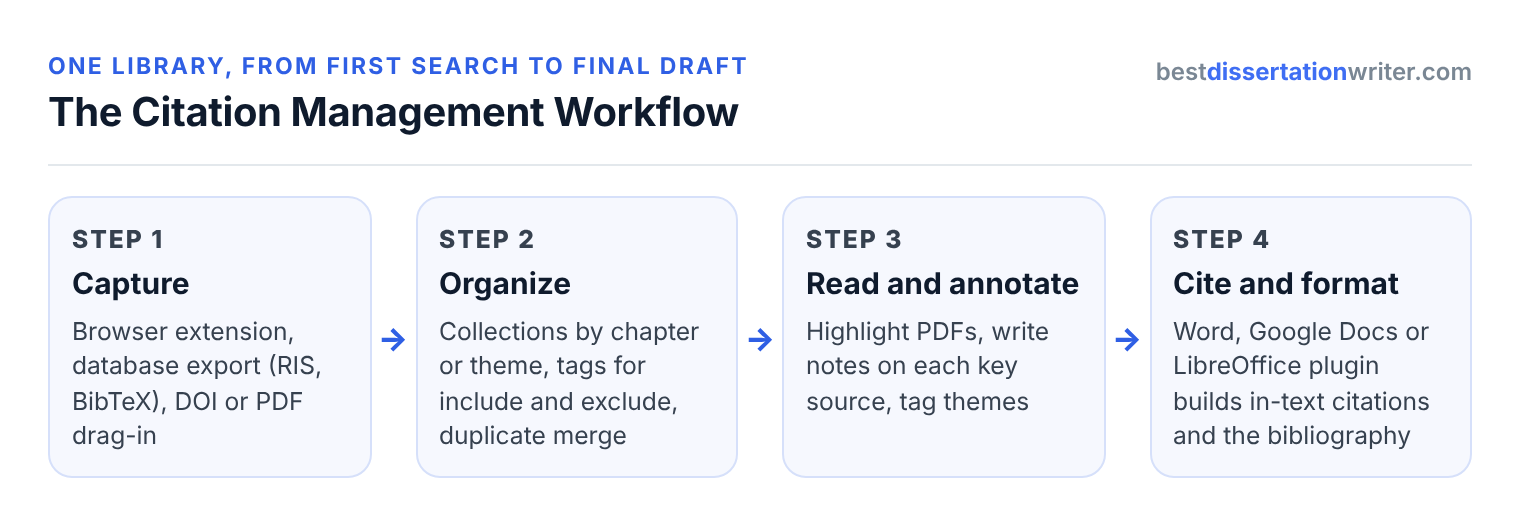
Capture and import references
The first job of any reference manager is getting references in quickly and accurately. Good tools offer several ways to capture references.
- Browser extension: a browser extension, such as the Zotero Connector, saves the article you are viewing, with its metadata and often the full text PDF, in one click. This is the fastest way to build your library from library databases and journal websites.
- Import from databases: most library databases let you export results in RIS or BibTeX format, which you can import references from in bulk. This is useful after a systematic search, when you may have hundreds of records.
- DOI and PDF lookup: you can add an item by typing its DOI or by dragging in a PDF, and the software retrieves the citation information for you. Always check the result, because metadata can be incomplete.
Organize and annotate
Once references are in, you need to find them again. The organization features in citation management software turn a long list into a working research library.
- Folders and collections: group references by chapter, theme or search. One reference can sit in several collections without being duplicated.
- Tags and notes: add a tag, such as “methods” or “include”, and write notes that are stored as notes with the reference. Tags make it easy to pull together every source on a theme when you write.
- PDF management and annotation: most tools let you read, highlight and annotate PDFs inside the program. Your annotations stay linked to the reference, so a quotation is never separated from its source.
Cite while you write: citation styles and export
The feature that saves the most time is citation insertion in your word processor. When you use citation plugins, the reference manager adds each citation and updates your references in Word, Google Docs or LibreOffice as you draft.
- Word processor plugins: Zotero has plugins for Microsoft Word, LibreOffice and Google Docs, and EndNote integrates with Word and Google Docs. Mendeley offers a citation add-in for Microsoft Word.
- Citation styles: most tools support thousands of citation styles, many through the open Citation Style Language. You can change from APA to Harvard for the whole document in a few clicks.
- LaTeX and BibTeX: if you write in LaTeX, use a tool that exports BibTeX with stable citation keys, such as Zotero with a BibTeX export add-on or JabRef. Pandoc users can also cite from these files.
Sync, share and collaborate
Most citation management software is web-based or syncs to the cloud, so your library is available on every device. Sharing features matter if you work with a supervisor or research teams.
- Sync: cloud storage keeps your references and PDFs in step across your laptop, a library computer and a web browser. Check how much free cloud storage you get, because PDFs fill it quickly.
- Shared libraries: group libraries or a shared folder let collaborators add and cite the same references. This is essential for a co-authored manuscript or a systematic review team.
- Permissions: some tools let you set who can view or edit a shared library. Use read-only access for supervisors who only need to check your sources.
Zotero vs Mendeley vs EndNote: A Citation Manager Comparison
Zotero, Mendeley and EndNote are the reference management tools most often supported by university libraries. All three can do the core tasks well, so the best reference manager is the one that fits your budget, your word processor and your field.
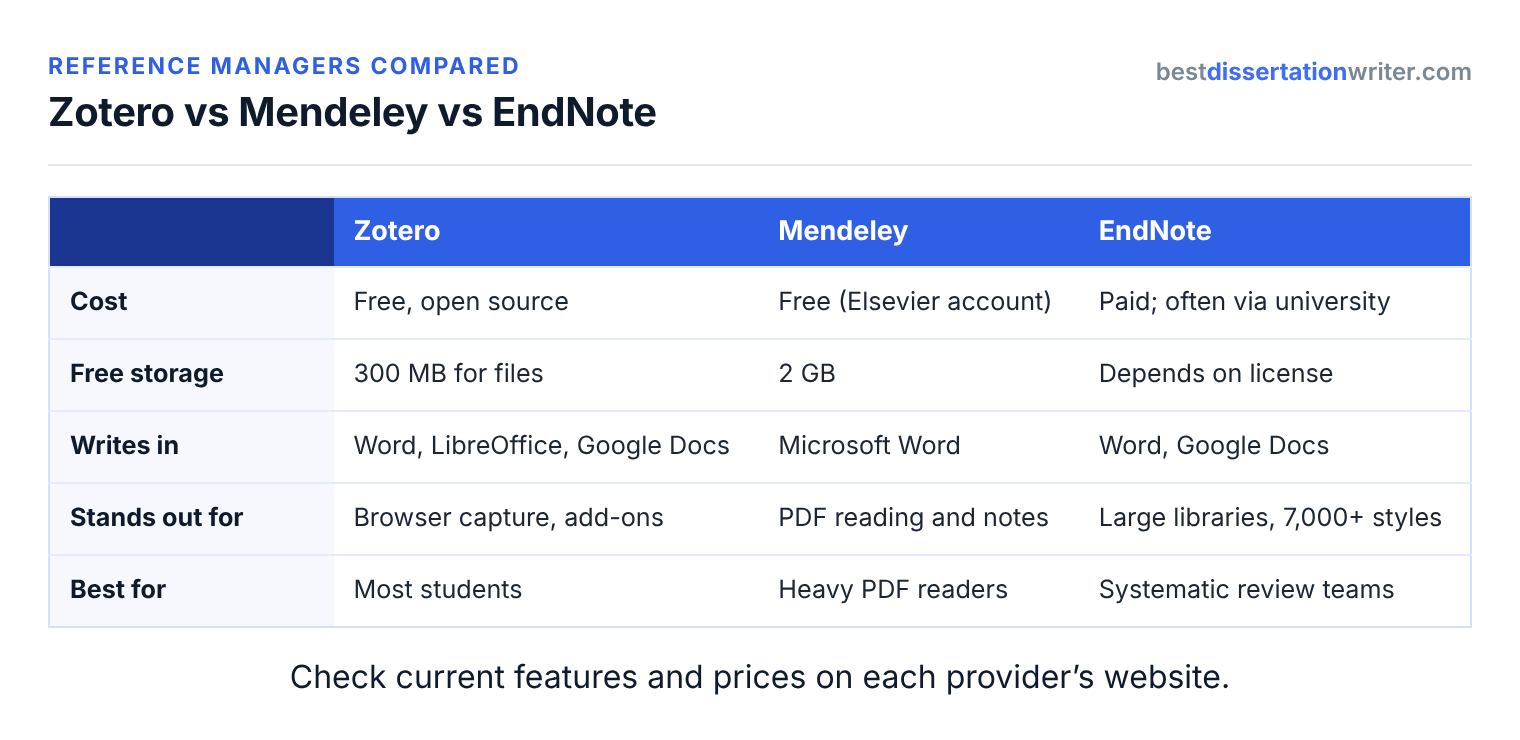
| Feature | Zotero | Mendeley | EndNote |
|---|---|---|---|
| Cost | Free and open source; optional paid storage | Free with an Elsevier account | Paid, with a free trial; often licensed by universities |
| Free storage | 300 MB of cloud storage | 2 GB of storage | Depends on your license |
| Word processors | Word, LibreOffice and Google Docs | Microsoft Word add-in | Word and Google Docs |
| Strengths | Browser capture, flexibility, large add-on community | PDF reading and annotation, simple interface | Large libraries, advanced editing, sharing with up to 1,000 people |
| Best for | Most students, any field, any budget | Students who read and annotate many PDFs | Systematic reviews and institutions that provide it |
Features and prices change. Check each provider’s website, and your university library’s research guides, before you choose.
Zotero
Zotero is a free, open-source research tool, created at George Mason University’s Roy Rosenzweig Center for History and New Media and now developed by the nonprofit Corporation for Digital Scholarship. It is the citation management software most librarians recommend to students who have no tool yet.
- What it does well: the Zotero Connector captures references from almost any website, and the integrated PDF reader lets you annotate and pull highlights into notes. Zotero citation plugins work in Word, LibreOffice and Google Docs.
- Storage: Zotero gives every user 300 MB of free cloud storage for PDFs, with paid plans for more. Your references themselves sync without counting against that limit, and you can store PDFs locally if you prefer.
- Limitations: heavy PDF users may need to pay for storage or use local files. Some advanced features, such as better BibTeX export, need free add-ons.
Mendeley
Mendeley Reference Manager is owned by Elsevier and offers 2 GB of free storage. It is popular with students in the sciences who want a simple interface and strong PDF annotation.
- What it does well: Mendeley makes it easy to read, highlight and annotate PDFs and to keep them synced across devices. Its interface is clean, and it is quick to learn.
- Citing: the Mendeley citation add-in works inside Microsoft Word and formats citations and bibliographies in common styles.
- Limitations: you need an Elsevier account, and options for other word processors are more limited than Zotero’s. Check that the current version supports everything you need before you commit.
EndNote
EndNote, made by Clarivate, is a paid reference manager with a long history in universities and research institutes. Many universities provide it to students and faculty, so check with your library before you buy it.
- What it does well: EndNote handles very large reference libraries, offers detailed control over citation formatting and supports over 7,000 citation styles. It also lets you share libraries with up to 1,000 people.
- Citing: EndNote integrates with Word and Google Docs to insert citations and bibliographies as you write.
- Limitations: it costs money if your institution does not provide it, and it takes longer to learn than Zotero or Mendeley. It is often more than a single student project needs.
Other citation management tools worth knowing
Zotero, Mendeley and EndNote are not the only options. Any comparison of reference management software will also mention a few specialist writing tools that suit particular workflows.
- JabRef: JabRef is a free and open-source reference manager built around BibTeX files. It suits students who write in LaTeX and want full control over their citation keys.
- Library management features in databases: some databases let you save records to a personal folder online. These are useful for a quick search, but they do not replace citation management software, because they cannot format references in Word.
- Your university’s research guides: research guides at university libraries often compare the tools they support and explain how to install them. They are the best place to check what will help manage your references locally, and who to ask for help.
How to Choose the Best Reference Manager for You
There is no single best reference manager for everyone, and the right citation management software for a nursing student may differ from the right one for a historian. Work through these points, and the right choice usually becomes clear.
- University support: ask which citation management software your university supports. Many university libraries publish research guides for one or two tools and offer training. Using a supported tool means you can get help from a librarian when something goes wrong.
- Your word processor: check which reference manager plugins work with the program you write in. If you write in Google Docs or LibreOffice, Zotero is the safest choice. If you write in Word, all three work.
- Your budget: decide what you can spend, if anything. If you have no institutional license, Zotero and Mendeley are free. EndNote makes most sense when your university pays for it.
- Your PDF library: estimate how many PDFs you will store. If you will keep hundreds of PDFs in the cloud, compare the free storage limits. Mendeley’s 2 GB goes further than Zotero’s free 300 MB.
- Collaboration: think about whether you will share references with others. For a research team or a systematic review, choose a tool with good shared libraries and permissions. Make sure every collaborator uses the same one.
- LaTeX writing: if you write in LaTeX, choose a tool that exports clean BibTeX, such as Zotero with an add-on, or JabRef.
Two ways to choose a citation manager
Weak
“I’ll pick the one my friend uses and sort out references at the end.”
The tool may not fit your word processor, and leaving references to the end defeats the purpose.
Strong
“My library supports Zotero, I write in Google Docs and I have no budget, so I’ll install Zotero and the Connector before my first search.”
A choice based on support, workflow and cost, made at the start of the project.
How to Set Up Citation Management Software in Your Research Workflow
This step-by-step guide uses Zotero as the example, because it is free for everyone, but the same steps apply to Mendeley and EndNote. Set aside about an hour to get your citation management software working before you start your literature search.
- Install the desktop app and create an account. Download the reference manager from its official website and create a free account, so your library syncs. Use your university email if your library supports the tool.
- Add the browser extension. Install the browser connector for Chrome, Firefox, Edge or Safari. Test it on a journal article page: one click should save the reference and, where available, the PDF download.
- Install the word processor plugin. Add the plugin for Microsoft Word, Google Docs or LibreOffice, and check that a new menu or toolbar appears. Insert a test citation to make sure it works.
- Choose your citation style. Set your default style, such as APA 7th edition, in both the app and the plugin. Download any extra style your department needs from the style repository.
- Build your folder structure. Create collections for each chapter or theme, plus an “inbox” for new items and a “to check” folder. Decide on a short list of tags, such as “include”, “exclude” and “key study”.
- Import your existing references. Drag in PDFs you already have, or import a RIS or BibTeX file from a database search. Merge duplicates and check each record’s author names, year, title and DOI.
- Cite while you write and back up. Insert every citation through the plugin rather than typing it, so your bibliography updates itself. Turn on sync and keep a local backup of your library.
Template
Collections: [01 Inbox] | [02 To check] | [Chapter 2: Theme 1] | [Chapter 2: Theme 2] | [Methods sources] | Tags: [include] [exclude] [key study] [qualitative] [quantitative] | Default style: [APA 7]
How to Organize References and Keep Track of Your Sources
Citation management software is only as useful as the way you organize it. A little structure at the start makes research and writing much faster, and it turns your reference management software into a real literature management system.
- Mirror your outline: create one collection for each theme or section of your literature review. When you write a section, everything you need is already in one place.
- Use tags for decisions: tag sources as include, exclude or maybe as you screen them. For a systematic review, this gives you a record of every decision for your flow diagram.
- Write a note for every key source: add a two- or three-sentence summary and your critical comments to each important reference. These notes become the raw material for your synthesis.
- Keep the original PDF: attach the full text to every reference you cite. If an examiner asks about a quotation, you can find it in seconds.
- Clean as you go: fix capitalization, missing DOIs and duplicate records when you add an item, not at the end. A clean library produces a clean reference list.
For how your sources come together into chapters, see our guides on how to write a literature review and writing a literature review. If you are running a systematic search, our guide to systematic literature review structure shows how to report it.
Common Mistakes With Citation Management Tools
Citation management tools prevent many errors, but they also create a few of their own. Watch out for these mistakes whichever reference manager you use.
- Trusting imported data blindly: citation management software is only as accurate as the data it receives, and metadata from websites and PDFs is often incomplete, with missing page numbers, wrong capitalization or an author listed as an organization. Check every reference before your final draft.
- Mixing tools: using Zotero for one chapter and Mendeley for another means two libraries and broken citations. Choose one tool for the whole project.
- Typing citations by hand: manual citations are not linked to your library, so your reference list and in-text citations drift apart. Use the plugin every time.
- Not backing up: sync is not a backup. Export your library regularly, especially before a deadline or a software update.
- Ignoring style rules: software applies a style’s rules, but it cannot fix a wrong item type, such as a report saved as a journal article. Learn the basics of your citation style so you can spot errors.
To see well-referenced chapters, browse our literature review examples. For the wider project, see our guide on how to write a dissertation.
FAQs About Citation Management Software
What is citation management software?
Citation management software is a program that stores your references and their PDFs, organizes them and inserts citations and bibliographies into your writing in the style you choose. Common examples are Zotero, Mendeley and EndNote.
You capture each source once, usually with a browser extension or a database export, and the software reuses that record every time you cite it. This keeps in-text citations and your reference list consistent, lets you change citation styles in a few clicks and saves a great deal of time on a literature review or dissertation.
What is the best free reference management software?
For most students, Zotero is the best free reference management software. It is open source, works with Word, LibreOffice and Google Docs, captures references from almost any website and is widely supported by university libraries. Its free plan includes 300 MB of cloud storage for PDFs.
Mendeley is also free, with 2 GB of storage, and suits students who read and annotate many PDFs in Word-based workflows. If your university provides EndNote, that is free to you as well. The best choice is the one your library supports and your word processor works with.
Is Zotero better than EndNote?
Neither is better for everyone. Zotero is free, easy to learn and works in Word, LibreOffice and Google Docs, which makes it a strong choice for most students. EndNote is paid, but it handles very large libraries well and offers detailed control over citation formatting.
If your university provides EndNote and you are running a large systematic review, EndNote may suit you. If you are paying yourself, writing in Google Docs or want something quick to learn, Zotero is usually the better fit. Whichever you choose, use it consistently from start to finish.
Can I switch reference managers later?
Yes. Most reference managers can export your library in a standard format, such as RIS or BibTeX, and import it into another tool. Your references, and often your notes and attachments, can be moved with some care.
However, citations already inserted in a document are usually linked to the original tool, so switching in the middle of a draft can break them. If you need to change, do it between chapters, test the move on a copy and keep your old library until you are sure everything has transferred correctly.
Best Dissertation Writers
Need help with your literature review?
Get a critical, well-structured review with current sources and a clear research gap.