

How to Use Boolean Operators to Combine Search Terms in a Database Search for a Literature Review
 By Dr. Robertson Prime, Research Fellow
Updated November 16, 2026
15 min read
About 3,100 words
Boolean operators are the words AND, OR and NOT, used to combine search terms so that a database returns exactly the kind of results you need. They are the most useful search skill you can learn for a literature review: with them, you can narrow or broaden your search, exclude unwanted topics and build search strings that you can repeat and report.
This guide explains how Boolean operators work, with Venn diagrams, worked Boolean search examples and a step-by-step method for building a full search string. It also covers parentheses, quotation marks and truncation, and how Boolean search operators behave in library databases, Google and Google Scholar.
- The basics: what each of the three Boolean operators does, and when to use AND, OR or NOT.
- The tools: parentheses, phrase searching and truncation, which make Boolean search terms far more precise.
- The method: a step-by-step guide to building a search string, Boolean search examples by subject and the most common mistakes to avoid.
On this page
Key takeaways
- Boolean operators connect search terms: AND narrows, OR broadens and NOT excludes.
- Put synonyms together with OR inside parentheses, then join the groups with AND.
- Use quotation marks for exact phrases and an asterisk for word endings, but check each database’s symbols.
- Save every search string, so you can repeat it and describe it in your literature review.
What Are Boolean Operators?
Boolean operators are specific words used to tell a database how your search terms relate to each other. They are named after the mathematician George Boole, whose logic of true and false statements underlies the way computers combine conditions.
When you type two words into a search box without an operator, the database has to guess what you mean. Boolean operators remove the guesswork: they tell the database whether a result must contain both terms, either term or one term but not the other.
- Why they matter for a literature review: a literature search may return thousands of results. Boolean operators let you narrow down your search to the studies that really answer your research question, and broaden it where you have too few.
- Why they make your search repeatable: a written Boolean search string can be run again later, by you or by someone else, with the same results. This is why systematic reviews report their full search strings.
- Where they work: almost all library databases use Boolean operators, including PubMed, CINAHL, ERIC, APA PsycInfo, Scopus and Web of Science. Search engines such as Google support some of them, with their own rules.
The Three Boolean Operators: AND, OR and NOT
There are three main Boolean operators. Each one changes the size of your results in a predictable way.
| Operator | What it does | Effect on results | Example |
|---|---|---|---|
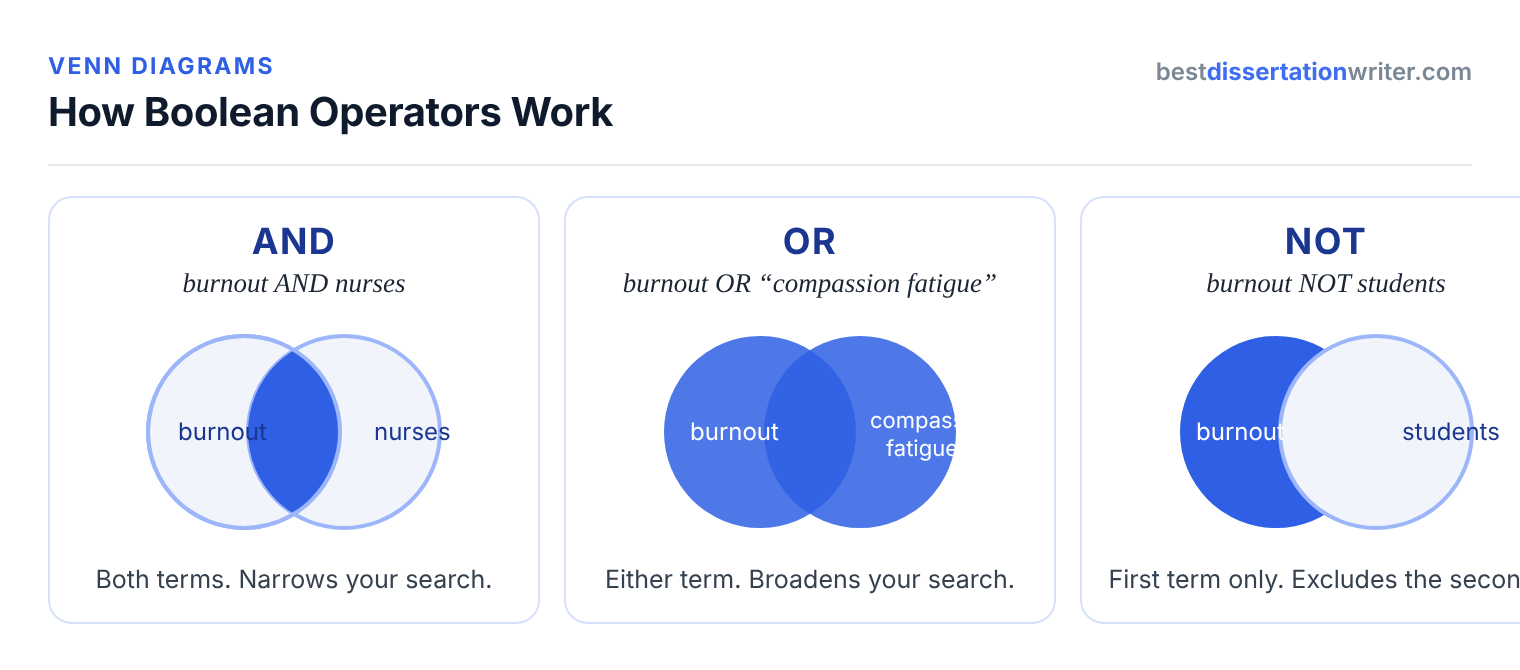
| AND | Results must contain all the terms | Fewer, more focused results | burnout AND nurses |
| OR | Results may contain any of the terms | More, broader results | burnout OR “compassion fatigue” |
| NOT | Results must not contain the term after NOT | Fewer results, one topic removed | burnout NOT students |
AND: narrow your search
AND tells the database that every term must appear in each result. It is the operator you will use most, because it joins the different concepts in your research question.
- How it works: a search for burnout AND nurses returns only records that mention both burnout and nurses. In a Venn diagram, this is the intersection where the two circles overlap.
- When to use it: use AND to connect separate concepts, such as a population, a problem and a setting. Each extra AND makes your results smaller and more relevant.
- When to be careful: adding too many concepts with AND can remove useful studies that do not mention every term. If your results drop to almost nothing, remove the least important concept.
OR: broaden your search
OR tells the database that any of the terms may appear. It is how you include synonyms and related terms, so you do not miss studies that use different words for the same idea.
- How it works: a search for burnout OR “compassion fatigue” OR “emotional exhaustion” returns records that mention any of the three. In a Venn diagram, this is everything inside all the circles.
- When to use it: use OR within a single concept, to combine synonyms, spelling variants and related terms. For example, teenagers OR adolescents OR “young people” covers the many ways authors describe the same population.
- Why it matters: researchers in different countries and disciplines use different terms. Using OR to combine your keywords is the best protection against missing relevant studies.
NOT: exclude terms
NOT tells the database to leave out any record that contains the term after it. It is useful but risky, so use it sparingly.
- How it works: a search for burnout NOT students returns records about burnout that do not mention students. In a Venn diagram, this is the first circle with the overlap removed.
- When to use it: use NOT to remove a clearly unwanted meaning or group, such as studies of animals when you want humans, or a different use of the same word.
- Why it is risky: NOT removes every record that mentions the term at all, including relevant studies that mention it in passing. A study of nurse burnout that briefly compares nurses with nursing students would be lost.
Use Boolean operators to combine search terms together in your search
Boolean searches are a conversation with the database. Each query you type tells the database which records to retrieve, and each search result shows how it understood you.
- Start simple: use the Boolean operators AND and OR first, with two or three concepts. Look at the first page of results, then add detail, such as a phrase in quotation marks or a truncation symbol.
- Change one thing at a time: if you add a synonym with OR and a new concept with AND at the same moment, you cannot tell which change helped. Adjust one part of the string, rerun it and compare the number of results.
- Know when to broaden your search results: if a search returns only a handful of records, add synonyms, remove the least important concept or widen the date range. If it returns thousands, add a concept with AND or a field limit, such as title and abstract only.
- Use the Boolean logic consistently: once a search string works in one database, adapt the same Boolean search terms for the others, changing only the symbols and subject headings each database uses. Every opening parenthesis needs a closing one, so check the string before you run it.
Parentheses, Quotation Marks and Truncation
Boolean operators become far more powerful when you combine them with three other search tools. Together, they let you control exactly what the database retrieves.
Parentheses: group your search terms
Parentheses tell the database which operation to do first, just as brackets do in arithmetic. They are essential whenever you use AND and OR in the same search.
- How they work: in (burnout OR “compassion fatigue”) AND nurses, the database first finds records with either burnout term, then keeps only those that also mention nurses.
- Why they matter: without a parenthesis around each group, databases apply their own order of operations, which may not be what you intended. Enclose each set of synonyms within parentheses to keep your logic clear.
- Nesting: you can place parenthetical groups inside larger expressions, but keep it simple enough that you can explain the search in your methods.
Quotation marks: search for an exact phrase
Quotation marks tell the database to search for words together, in that order. They are vital for terms made of more than one word.
- How they work: “mental health” returns records containing that exact phrase, rather than records that mention mental and health separately anywhere in the text.
- When to use them: use quotation marks for established phrases such as “nurse burnout”, “remote work” or “academic achievement”.
- When to avoid them: phrases are strict, so “burnout among nurses” would miss “nurse burnout”. Use the shortest common form of a phrase, or combine variants with OR.
Truncation and wildcards: search for word endings
Truncation finds different endings of a word, so you do not have to type every form. The symbol is usually an asterisk, but some databases use another symbol.
- Truncation: teach* finds teach, teacher, teachers and teaching. Place the symbol after enough letters to keep the meaning: nurs* finds nurse and nursing, but also nursery.
- Wildcards: in many databases, a symbol such as ? or # replaces a single letter, so organi?ation finds both the American and the British spelling of organization. Check the help pages, because the symbols vary.
- Proximity operators: some databases also let you find words near each other, using operators such as NEAR or ADJ. They are more advanced, but useful when a phrase search is too strict.
How to Build a Boolean Search String Step by Step
A good search string is built, not guessed. Follow these steps to turn your research question into Boolean search terms you can run in any database.
- Write your research question. For example: “What factors are associated with burnout among nurses working night shifts in hospitals?” A clear question is the source of all your search terms.
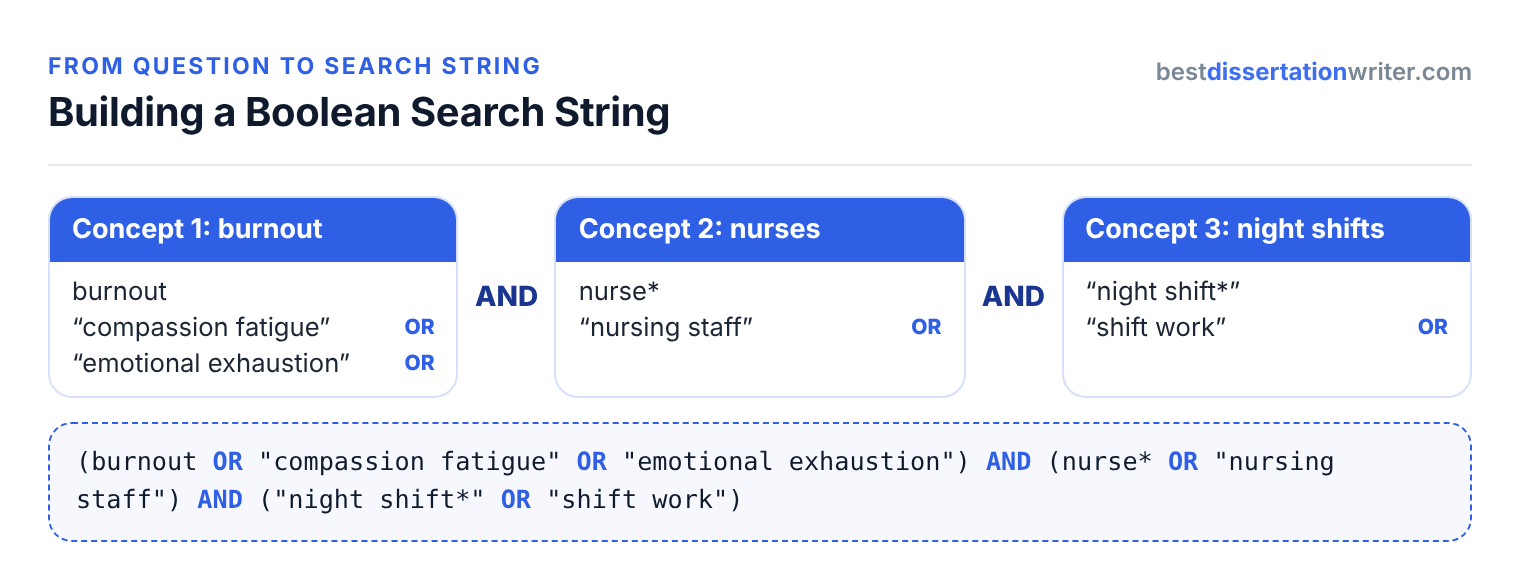
- Pick out the main concepts. Identify the two to four key ideas, here burnout, nurses and night shifts. Leave out general words such as “factors” or “associated”, which add little to a search.
- List synonyms for each concept. In a column for each concept, list other words authors might use: burnout, “compassion fatigue”, “emotional exhaustion”; nurse*, “nursing staff”; “night shift*”, “shift work”. Check the subject headings in your database, such as MeSH in PubMed, for more.
- Join synonyms with OR, inside parentheses. Each column becomes one group: (burnout OR “compassion fatigue” OR “emotional exhaustion”). This broadens each concept as far as it should go.
- Join the groups with AND. Combine the concept groups so every result covers all your concepts: (burnout OR “compassion fatigue”) AND (nurse* OR “nursing staff”) AND (“night shift*” OR “shift work”).
- Run, review and refine. Check the first 20 or 30 results. If most are irrelevant, add a concept or a NOT; if there are too few, add synonyms with OR or remove a concept.
- Record the final string. Save the exact string, the database, the date and the number of results in a search log. You will need them for your methods section.
Template
([concept 1] OR [synonym] OR [synonym]) AND ([concept 2] OR [synonym]) AND ([concept 3] OR [synonym]) | Database: [name] | Date: [date] | Limits: [years, language, peer-reviewed] | Results: [number]
Boolean Search Examples by Subject
These Boolean search examples show how Boolean operators work the same way across fields. Adapt the terms to your own research question and database.
| Subject | Research question | Boolean search string |
|---|---|---|
| Nursing | Does peer support reduce nurse burnout? | (burnout OR “emotional exhaustion”) AND (nurse* OR “nursing staff”) AND (“peer support” OR mentor*) |
| Education | How does feedback affect student motivation online? | (feedback) AND (motivation OR engagement) AND (“online learning” OR “distance education”) |
| Business | Does remote work affect employee retention? | (“remote work” OR telework* OR “working from home”) AND (retention OR turnover) |
| Psychology | Is social media use linked to anxiety in adolescents? | (“social media”) AND (anxiety) AND (adolescen* OR teen* OR “young people”) |
Illustrative Boolean search examples. Test and refine each string in your own database.
Two Boolean search examples on the same topic
Weak
remote work employee retention studies
No Boolean operators, no synonyms and no phrases, so the database guesses and many relevant studies are missed.
Strong
(“remote work” OR telework* OR “working from home”) AND (retention OR turnover OR “intention to stay”)
Synonyms joined with OR, concepts joined with AND, and phrases in quotation marks.
See how one search was refined in three rounds
Round 1: “remote work” AND retention returned too few results, because many studies use other terms. Round 2: adding synonyms with OR, (“remote work” OR telework* OR “working from home”) AND (retention OR turnover), returned a manageable, relevant set.
Round 3: many results were about students working from home, so NOT students was tested, then dropped because it also removed relevant workplace studies. A date limit was used instead.
Using Boolean Operators in Library Databases, Google and Google Scholar
Boolean operators work in most search tools, but each one has its own rules for Boolean search operators. Knowing the differences saves a lot of frustration.
Library databases
Library databases, such as those your university library subscribes to, are where Boolean search operators work best. Most offer an advanced search screen with separate search boxes joined by AND, OR and NOT.
- Advanced search boxes: type one concept group in each box and choose the operator between boxes from a menu. This builds the search string for you and avoids mistakes with parentheses.
- Subject headings: many databases use controlled vocabulary, such as MeSH in PubMed or CINAHL Headings. Combining subject headings and keywords with OR gives the most complete results.
- Help pages: each database lists its truncation symbol, phrase rules and operators. Many university libguides, such as the Utah State University Libraries guide to Boolean operators, explain them with examples.
Google and Google Scholar
Search engines support some Boolean operators, but they are designed to interpret natural language, so results are less predictable than in a library database.
- Google: Google treats spaces between words much like AND, supports OR in capital letters, uses quotation marks for exact phrases and uses a minus sign in front of a word to exclude it. It does not support every operator a database does.
- Google Scholar: Google Scholar also supports OR, quotation marks and the minus sign, and its advanced search lets you search by author, publication and date. It is useful for finding scholarly sources quickly, but it does not show a full search history, so record your strings yourself.
- Using both: many students start in Google Scholar to explore a topic, then run their final Boolean search terms in at least one subject database, where the search can be controlled and reported.
For how searching fits the rest of the review process, see our step-by-step guide on how to write a literature review.
Common Boolean Search Mistakes and How to Fix Them
Most search problems come from a handful of mistakes with Boolean operators and Boolean search terms. Check your strings against this list.
- Using AND between synonyms: burnout AND “compassion fatigue” finds only records that mention both, which shrinks your results. Synonyms belong together with OR.
- Forgetting parentheses: burnout OR fatigue AND nurses can be read in two ways. Group the synonyms, (burnout OR fatigue) AND nurses, so the database follows your logic.
- Overusing NOT: NOT removes relevant studies that mention the excluded term in passing. Try a date limit, a field limit or an extra AND concept first.
- Too many concepts: joining five or six concepts with AND often returns almost nothing. Keep the two to four concepts that define your question.
- Phrases that are too long: a long phrase in quotation marks only finds that exact wording. Shorten it, or split it into concepts joined with AND.
- Not recording the search: if you do not save your final string, you cannot repeat the search or describe it in your methods.
Once your search returns the right studies, the next step is to judge them. Our guide to the critical literature review explains how, and our literature review examples show search strategies in finished chapters. For the wider process, see our guide on how to write a dissertation.
FAQs About Boolean Operators
Which are the Boolean operators?
The three main Boolean operators are AND, OR and NOT. AND requires all the terms to appear, which narrows your search, while OR allows any of them and is used for synonyms. NOT excludes records that contain a term.
Many databases also support related search tools, such as parentheses for grouping, quotation marks for exact phrases and truncation symbols for word endings. Some add proximity operators, such as NEAR, but these vary between databases, so check each one’s help page before you rely on them.
What is a Boolean example?
A simple Boolean example is (“remote work” OR telework*) AND retention. The OR combines two ways of describing the same idea, the parentheses group them, and AND requires every result to also mention retention.
The search therefore returns studies about remote work or telework that also discuss retention, and leaves out studies that cover only one of the topics. Most Boolean search examples follow this pattern: synonyms joined with OR inside parentheses, and concepts joined with AND. Once you know it, you can build Boolean search terms for any topic.
Does Google still use Boolean operators?
Google supports some Boolean-style operators. It treats spaces between words much like AND, accepts OR in capital letters, uses quotation marks for exact phrases and uses a minus sign before a word to exclude it. Google Scholar supports similar operators.
However, Google is designed to interpret natural language, so results are less predictable than in a library database. For a literature review, run your final Boolean search terms in at least one subject database, where you can control and record the search.
How do I use Boolean operators in Google Scholar?
In Google Scholar, type OR in capital letters between synonyms, put phrases in quotation marks and place a minus sign before a word you want to exclude. You can group terms with parentheses, for example (“remote work” OR telework) retention, where the space acts like AND.
Use the advanced search menu to limit results by author, publication or date. Because Google Scholar does not keep a search history, copy each search string into a log with the date and number of results, so you can report it later.
Best Dissertation Writers
Need help with your literature review?
Get a critical, well-structured review with current sources and a clear research gap.